
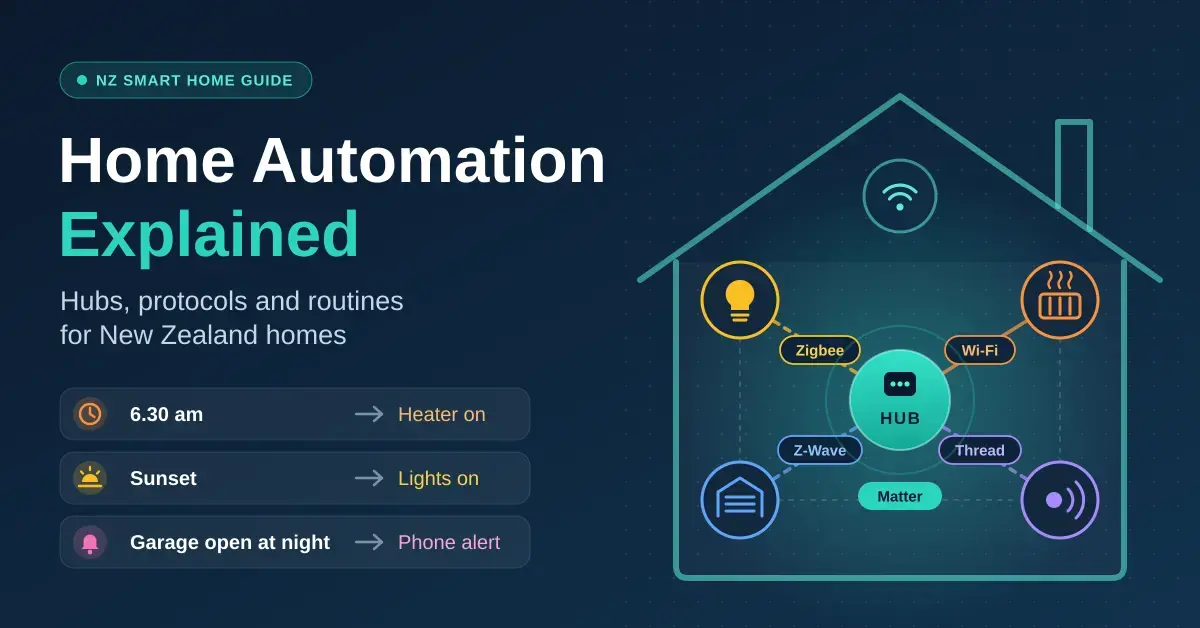
Home automation means your devices act on their own instead of waiting for you to tap an app: a heater that comes on at 6.30 am, lights that follow the sunset, a phone alert when the garage door is still open at night. Most of what New Zealand homes actually use day to day is that simple. This beginner-friendly explainer walks through the parts of a smart home — devices, protocols, hubs and routines — so you understand how they fit together before you spend a cent.
If you have not chosen any gear yet, start with our beginner’s guide to smart home devices in NZ and then come back here to connect everything up. The quick guide further down tells you whether you even need a separate hub.
Key takeaways
- Home automation is triggers, conditions and actions — controlling things from an app is only the first step.
- Most beginners do not need a separate hub: a recent smart speaker or display can do the job.
- Zigbee, Z-Wave and Thread are low-power mesh radios for sensors; Matter is the shared language that runs over Wi-Fi and Thread.
- Buy the AU/NZ version of Z-Wave gear (919.8/921.4 MHz) and of anything that plugs into the wall.
- Hard-wired smart switches, dimmers and relays are electrical work — use a licensed electrician.
What is home automation, and how does it work?
Home automation is the combination of triggers, conditions and actions that let devices respond to your home without you doing anything. Switching a plug on from your phone is remote control; automation is that plug switching itself because a rule told it to. Every system, from a single smart plug to a wired whole-house install, is built from the same four layers.
- Devices do the sensing and switching: door and motion sensors, smart plugs, bulbs, locks, cameras and heat-pump Wi-Fi controllers.
- Protocols carry the messages. Wi-Fi is the most common, while Zigbee, Z-Wave and Thread are low-power mesh radios built for battery sensors.
- A hub or controller translates between protocols and runs the logic. It might be a smart speaker, a brand bridge or a dedicated hub such as Home Assistant.
- Automations are the rules you set: when something happens, check a condition, then act.
Getting those four layers to line up is the whole game. Pick devices that speak a protocol your hub understands, then write simple rules; almost everything else is detail.
Smart home routines worth setting up
A good routine has three parts. The trigger starts it (a time, a sensor, your phone leaving home), a condition decides whether it should run (only after sunset, only on weekdays), and the action is what happens. These are the automations that earn their keep in NZ homes, where heating and damp are the everyday problems worth attacking first.
| Routine | Trigger | Action | What you need |
|---|---|---|---|
| Winter warm-up | 6.30 am on weekdays | Heat pump to 20°C, or heater on via a smart plug | Heat-pump Wi-Fi control or a smart plug |
| Damp control | Bedroom humidity above 65% | Dehumidifier on until it drops | Humidity sensor, smart plug, hub |
| Leaving home | Last phone leaves the house | Lights and heaters off, cameras armed | Speaker or hub with presence detection |
| Home after dark | Front door opens after sunset | Hallway light on | Contact sensor and smart bulb |
| Garage check | Door still open at 9 pm | Phone alert | Door or tilt sensor |
| Holiday mode | Evenings while you are away | Lamps on and off at varied times | Smart plugs or bulbs |
Heating is the routine to get right first, because it is usually the biggest number on your power bill. Our smart plug guide covers which heaters are safe to run on a plug and what scheduling actually saves, and many modern units let you add Wi-Fi control to a heat pump for timed warm-ups and away-from-home tweaks.
Automations that stay reliable
- Keep a plain schedule as a fallback for anything important, such as heating, so a failed sensor does not leave you cold.
- Give devices clear names and rooms (“Bedroom 2 heater”), because voice assistants and routines rely on them.
- Avoid long chains where one routine triggers another; they are hard to debug when something misfires.
- Decide what should happen after a power cut. Heaters are safest left off until you switch them on yourself.
- Test a new routine for a week before you trust it with anything that matters.
Zigbee vs Z-Wave vs Matter: which protocol should you use?
Wi-Fi needs no hub and suits plugs, cameras and anything mains-powered, but it drains batteries fast and every device adds load to your router. Zigbee is a 2.4 GHz mesh used by bulbs and sensors from brands such as Philips Hue and Aqara; it needs a coordinator, and mains-powered Zigbee devices relay signals for the rest. Z-Wave uses a sub-GHz band — 919.8 MHz and 921.4 MHz in the Australia and New Zealand region — which travels well through walls; it is common in locks and sensors, but you must buy the AU/NZ version. Thread is a newer, self-healing IPv6 mesh built for battery devices, and it is the low-power option that Matter uses.
| Protocol | Needs a hub? | Mesh? | Battery life | Best for |
|---|---|---|---|---|
| Wi-Fi | No | No (uses your router) | Poor | Plugs, cameras, heat pumps |
| Zigbee | Yes, a coordinator | Yes | Excellent | Bulbs and sensors |
| Z-Wave | Yes | Yes | Very good | Locks and sensors |
| Thread | A border router | Yes | Excellent | New Matter sensors and plugs |
| Bluetooth | No | Limited | Good | Setup and short-range locks |
What is Matter, and why does it matter?
Matter is not a radio — it is a standard from the Matter project at the Connectivity Standards Alliance (the group once known as the Zigbee Alliance) that runs over Wi-Fi, Thread and Ethernet, using Bluetooth only during setup. A Matter device works with Apple Home, Google Home, Amazon Alexa and Samsung SmartThings, and it can be shared across several of them at once, so different people in the house can use their own app. That cross-brand promise is the reason Matter is worth buying into when you have the choice.
Which protocol should a beginner pick?
For most people, “Matter over Thread” for battery sensors and “Matter over Wi-Fi” for plugs is a sound default, provided you have a Thread border router (more on those below). If you are curious how Wi-Fi itself fits in, our explainer on how Wi-Fi works covers the bands and why crowded ones slow down. One firm rule for New Zealand: buy the AU/NZ version of any Z-Wave device. European (868 MHz) and North American (908 MHz) Z-Wave gear will not pair here and is not legal to transmit on those frequencies, so an imported bargain is usually a paperweight.
Do you need a smart home hub?
Often not. A handful of Wi-Fi devices work fine through their own apps, and a recent smart speaker or display covers voice control and simple routines. A hub earns its place once you add battery sensors, mix brands, or want automations that keep running when the internet drops. Match your situation to the simplest setup that covers it:
Do you need a hub? Quick guide
Match your situation to the simplest setup that covers it:
| Your situation | What to use |
|---|---|
| A few Wi-Fi or Matter plugs and bulbs, no sensors | No hub — each brand’s app, plus a smart speaker for voice if you want it |
| Battery door, motion or temperature sensors | A smart speaker or display with a Thread border router, or a brand bridge |
| Mixed brands and ecosystems in one household | Buy Matter devices and pick one hub with a Thread border router |
| Lots of devices, or automations that must run offline | A local hub such as Home Assistant Green |
| Hub type | Examples in NZ | What it connects | Good for |
|---|---|---|---|
| Smart speaker or display | Google Home Speaker (~$219), Echo Dot Max (~$229), HomePod mini (~$249) | Wi-Fi and Matter; Thread on these models | Most homes |
| Brand bridge | Philips Hue Bridge, Tapo H100 hub (~$39) | That brand’s lights or sensors | One-brand setups |
| Local automation hub | Home Assistant Green (about A$270–A$290 via Australian distributors) | Almost everything, with add-on radios | Tinkerers and large setups |
A local hub is the biggest step up: it runs automations on your own network and mixes brands in one app, with a Zigbee or Thread radio added for sensors. The official Home Assistant Green hardware page lists its specs and current price if you want the full picture.
Thread border routers: the detail that trips people up
A Thread border router is the bridge between low-power Thread devices and the rest of your network, and not every smart speaker has one. Amazon’s own Thread support documentation for Echo devices lists the Echo Dot Max, Echo Show 8, Echo Studio and Echo Hub as border routers — but not the basic Echo Dot, so skip that one if you want Thread sensors. On the Google side, the list of Google devices that work as Matter hubs covers the Nest Hub (2nd gen), Nest Hub Max, Google TV Streamer and the Google Home Speaker. For Apple households, a HomePod mini or an Apple TV 4K acts as the Home hub and the Thread border router in one box. Check this before you buy sensors, not after.
Home automation systems in NZ: wireless DIY or wired
Most NZ homes go wireless: plug-in and battery devices, a speaker or hub, and apps. It is cheap, renter-friendly and easy to change when you move or add a room.
The alternative is a wired system such as Clipsal C-Bus or KNX, where switches, dimmers and sensors are cabled back to a central controller. These are designed and installed by electricians and specialist integrators, mostly in new builds and major renovations. They are very reliable but cost far more and are hard to change later, so they suit people who want a permanent, whole-house setup rather than a weekend project.
When you need an electrician
Anything that connects to your home’s fixed wiring — smart wall switches, in-wall relays, dimmers, doorbell transformers and outdoor lighting — is electrical work. WorkSafe’s guidance on doing your own electrical work lets an owner-occupier replace some like-for-like fittings, but new wiring must be inspected and certified, and WorkSafe does not recommend DIY without the right skills. Tenants cannot do this work at all. For smart-home wiring, use a registered, licensed electrician and ask whether your switch boxes have a neutral wire, which many smart switches need to run.
Planning a new build or renovation
Walls are open only once, so a few extra dollars now saves a lot later:
- A neutral wire and deep boxes at every light switch.
- Cat6 Ethernet cable run to camera spots, the lounge TV, the office and ceiling Wi-Fi access points.
- Power and a cable at the front door for a wired doorbell and a smart lock with a keypad.
- A central spot near the router, with power, for hubs and a network switch.
- Spare conduit from the switchboard to the ceiling space for whatever you add next.
How much does home automation cost in NZ?
Home automation scales from about $50 to a new-build budget line, and you can stop at any level. These are realistic ranges for September 2026:
| Level | What you get | Rough cost (September 2026) |
|---|---|---|
| App control | A few smart plugs and bulbs on schedules | $50–$150 |
| Speaker-based automation | Speaker, plugs, bulbs, a couple of sensors | $190–$450 |
| Local hub setup | Home Assistant Green, a Zigbee or Thread radio, sensors | From about A$270 for the hub, plus radio and sensors |
| Wired system | C-Bus or KNX through an electrician or integrator | Quoted per job, usually a new-build budget item |
Security is often the next step after heating and lighting; our smart home security systems guide compares DIY kits with monitored alarms so you can see where the cost jumps.
How to get started with home automation, step by step
Start small and solve one real problem before you build anything clever. A sensible first-project order looks like this:
- Pick one problem — a cold house at 7 am, a garage door left open, lamps that should look lived-in while you travel.
- Choose a platform that matches the phones in your house (Apple Home, Google Home or Alexa), so voice and app control just work.
- Put a schedule on your biggest cost first. A smart plug or heat-pump controller on a timer usually pays for itself over one winter.
- Add battery sensors for doors, motion and humidity, favouring Thread or Zigbee models because they last far longer than Wi-Fi ones.
- Add a hub only when you outgrow the speaker — more devices, mixed brands, or a need for local control.
- Test each routine for a week and keep a manual fallback for anything important.
Security and privacy with smart home devices
Smart home gear adds cameras, microphones and always-on network devices to your house, so treat security as part of the setup rather than an afterthought. A few habits cover most of the risk:
- Change every default password and use a unique one per account; a password manager makes this painless.
- Keep device firmware and hub software up to date — most break-ins exploit old, unpatched software.
- Put cheap IoT devices on a guest or separate Wi-Fi network so a compromised gadget cannot reach your computers.
- Prefer local control (Thread, Zigbee or a Home Assistant hub) for cameras and locks, so they keep working and stay off the cloud.
- Before you buy, check what data leaves your home and whether the core features still work if the maker’s servers go offline.
Common mistakes to avoid
- Buying a hub before you know what it needs to connect.
- Choosing Wi-Fi sensors for doors and windows, then replacing batteries every few months.
- Importing Z-Wave devices built for another region’s frequency.
- Relying on cloud-only routines for heating or security.
- Letting patchy Wi-Fi decide where things work; a mesh Wi-Fi system fixes most dead spots.
More reading from around our network:
Prices, product line-ups and platform features change often; everything here was checked in September 2026, and NZ prices are approximate retail. Nicegear is independent, sells nothing and takes no paid placements.
Sources
Frequently asked questions (FAQ)
Do I need a hub for home automation?
Not always. A few Wi-Fi or Matter devices work through their apps or a smart speaker, but battery sensors, mixed brands and offline automations are much easier with a hub. Most homes are fine using a recent smart speaker as the hub and only move to a dedicated one once they add lots of sensors.
What is the difference between Zigbee, Z-Wave and Matter?
Zigbee and Z-Wave are low-power mesh radios that need a hub, with Z-Wave using 919.8 and 921.4 MHz in the AU/NZ region. Matter is not a radio at all but a standard that runs over Wi-Fi, Thread and Ethernet, so a Matter device can work across Apple, Google, Amazon and SmartThings at the same time.
How much does home automation cost in NZ?
App-controlled plugs and bulbs start at about $50, a speaker-based setup runs roughly $190 to $450, and a Home Assistant hub starts from about A$270 before radios and sensors. Wired systems such as C-Bus or KNX are quoted per job and are usually a new-build budget item.
Do I need an electrician for smart home automation?
Only for anything wired into your home’s circuits, such as smart wall switches, in-wall relays and dimmers, which are electrical work and must be done by a licensed electrician. Plug-in and battery devices are DIY, and tenants should stick to those.
Can home automation work without the internet?
Some of it can. Local hubs such as Home Assistant run automations on your own network, and Matter, Zigbee and Thread devices can keep working locally, but cloud-based routines and remote access stop until the connection returns. If offline reliability matters, choose devices and a hub that support local control.




