Walk into any New Zealand electronics shop and the Ethernet cable shelf runs from plain Cat5e patch leads to Cat8 cables wrapped in braided nylon at five times the price. For a home, almost all of that range is either too little or far too much. Cat6 is the right answer for nearly every run in an NZ house in 2026, and this guide explains why, when Cat6a earns its extra cost, what Cat8 is actually for, and how to buy and terminate cable without wasting money.
If you are new to the topic, our plain-English Ethernet guide explains what a wired connection gives you over Wi-Fi, and our home network setup guide covers where the cables should actually go.
Key points
- Buy Cat6 for in-wall runs. It carries gigabit and 2.5 Gbps over any household distance and 10 Gbps over runs up to about 55 m, for a few cents more per metre than Cat5e.
- Cat6a only pays off for planned 10 Gbps runs to a NAS or office over long distances; Cat7 is not a TIA Ethernet standard, and Cat8 is a 30 m data-centre cable with no benefit at home.
- Use solid-core cable for walls and ceilings, stranded for patch leads. Unshielded (U/UTP) is right for homes; shielded cable needs proper earthing to help at all.
- Keep any run under 90 m in the wall plus patch leads, away from mains cables, and use outdoor-rated cable in conduit between buildings.
- A 305 m box of solid Cat6 is roughly NZ$150–$250 in 2026, and a 2 m Cat6 patch lead NZ$5–$15. Braided Cat8 leads pay for the jacket, not the speed.
What do Cat5e, Cat6, Cat6a and Cat8 actually mean?
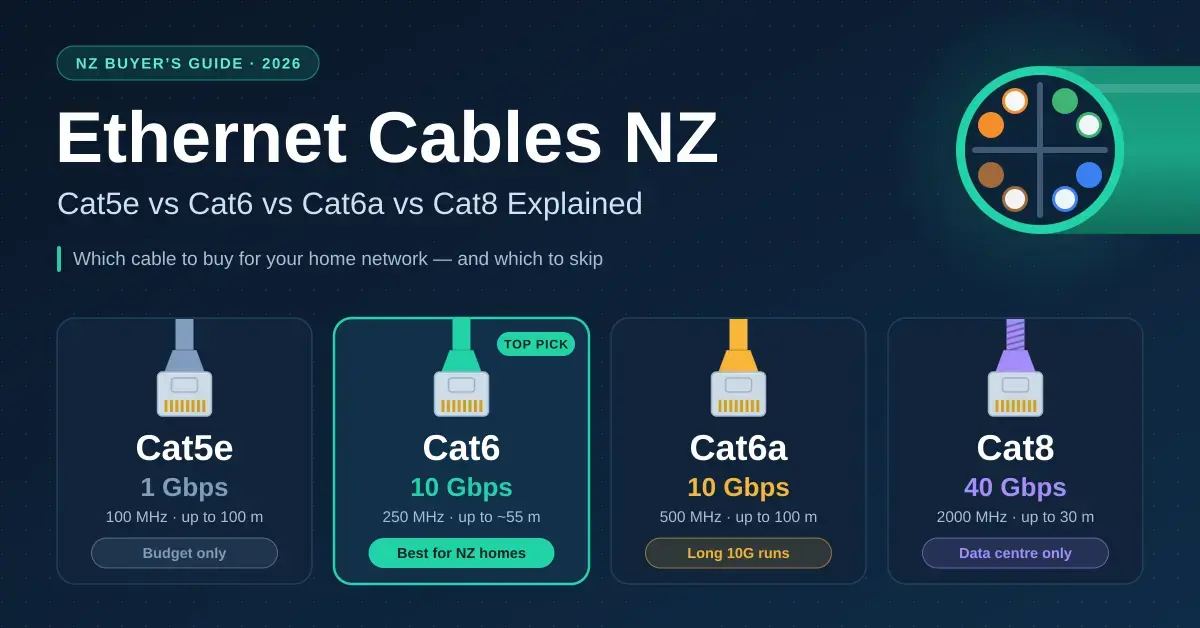
The category number tells you how much bandwidth the cable is tested to carry over a full 100-metre channel, which in turn sets the speeds it is guaranteed to run. Cat5e is rated for gigabit, Cat6 for gigabit at 100 m and 10 Gbps over shorter runs, Cat6a for 10 Gbps at the full 100 m, and Cat8 for 25 and 40 Gbps over just 30 m. Every category uses the same eight-pin RJ45 plug and works with every Ethernet device ever made, so there is never a compatibility question, only a speed-and-distance one.
Higher categories achieve their ratings mostly by testing to a higher frequency and controlling crosstalk (interference between the pairs inside the jacket) more tightly. Cat6 is tested to 250 MHz, Cat6a to 500 MHz, and Cat8 all the way to 2000 MHz. That extra headroom is real, but it only matters once you have a device fast enough to use it — and in a home, you rarely do.
Cable comparison
| Category | Rated at 100 m | 10 Gbps reach | Typical NZ price (Sept 2026) | Buy it for |
|---|---|---|---|---|
| Cat5e | 1 Gbps (2.5 Gbps usually works) | Not rated | 305 m box NZ$120–$180 | Nothing new; existing runs are fine to keep |
| Cat6 | 1 Gbps; 2.5 and 5 Gbps | About 37–55 m | 305 m box NZ$150–$250; 2 m lead NZ$5–$15 | Every in-wall run and patch lead in a home |
| Cat6a | 10 Gbps (500 MHz) | 100 m | 305 m box NZ$300–$450; leads NZ$10–$25 | Long 10 Gbps runs to a NAS, office or server |
| Cat7 / Cat7a | 10 Gbps (ISO/IEC class, not a TIA Ethernet standard) | 100 m | Leads NZ$10–$30 | Skip; RJ45 "Cat7" leads are effectively Cat6a |
| Cat8 | 25/40 Gbps to 30 m (2000 MHz) | 30 m max channel | Leads NZ$15–$50 | Data-centre patching; no home device can use it |
Two practical notes come out of that table. First, Cat5e already in your walls does not need replacing: it carries gigabit and, in most homes, 2.5 Gbps too, which covers a Fibre Max plan and Chorus Hyperfibre 2000. Second, the “Cat7” and “Cat8” patch leads on NZ shelves are sold on the number. Cat7 was never a TIA Ethernet category at all — it is an older ISO/IEC cabling class — and any RJ45 lead labelled Cat7 behaves like a Cat6a lead on a home device. Fluke Networks’ Cat 8 vs Cat 6A explainer is a good primer if you want the engineering detail behind those class definitions.
Which Ethernet cable should you buy in New Zealand?
For almost every home, buy Cat6 for in-wall runs and stranded Cat6 patch leads at the ends. Cat6 costs only a few cents more per metre than Cat5e, carries gigabit and 2.5 Gbps over any household distance, and still handles 10 Gbps on the shorter runs you will actually make inside a house. The sections below cover the handful of cases where a different choice makes sense.
For everyday gigabit runs
Cat6 solid-core cable is the default. A TV, games console, Apple TV, printer or ordinary PC has a gigabit (1000 Mbps) port, so it cannot go faster than gigabit no matter what cable you feed it. Cat6 delivers that comfortably to 100 m and gives you spare headroom for the next upgrade. If you are wiring several rooms, plan the runs back to one cupboard so you can add a switch later; our guide to the best network switches for home use explains how to size one.
For 2.5GbE and Hyperfibre
Cat6 is the sensible floor once you move past gigabit. New routers, mini PCs, Wi-Fi 7 access points and NAS boxes increasingly ship with 2.5 Gbps (2.5GbE) ports, and Cat6 runs 2.5 Gbps easily over any length you will find in a house. Existing Cat5e usually manages 2.5 Gbps too, so you do not need to rewire — but for new runs, Cat6 removes all doubt. If you are on Hyperfibre, the leads between the fibre box (ONT), your router and your computer are the ones that carry the full speed; our modem router guide lists which router ports match each plan.
For 10 Gbps to a NAS, office or server
Cat6a is worth the extra money only for long 10 Gbps runs. If you are moving large video files between a 10G NAS and an editing PC, or wiring a home office for 10 Gbps, Cat6a guarantees the full speed over the whole 100 m channel where Cat6 does not. For the short 10G links most people make — a lead of a few metres between a NAS and a switch in the same room — Cat6 is inside its rated reach and Cat6a is optional. Our guide to home NAS storage covers when a 10G link is actually worth building.
Where do Cat7 and Cat8 fit?
They mostly do not, at home. Cat7/Cat7a is an ISO/IEC class rather than a TIA Ethernet standard, and “Cat7” leads sold with RJ45 plugs perform like Cat6a. Cat8 is a genuine standard, but it is built for 25 and 40 Gbps over a 30-metre maximum inside data centres — no consumer device has a port that fast, and the 30 m limit rules it out for structured home cabling anyway. Braided Cat7 and Cat8 patch leads are paying for the jacket and the number on the bag, not for speed you can use.
Solid vs stranded, and shielded vs unshielded
Two construction choices matter more than the category for most home installs: whether the copper core is solid or stranded, and whether the cable is shielded. Getting these right is what separates a link that just works from one that drops out.
Solid or stranded core?
Solid-core cable, sold in boxes for in-wall use, carries signal further and punches down cleanly onto keystone jacks and patch panels, but its single solid conductors crack if they are flexed repeatedly. Stranded cable, used in pre-made patch leads, bends happily but is limited to short lengths. Use each where it belongs: solid inside the walls and ceiling, stranded from the wall plate to the device. One thing to avoid entirely is copper-clad aluminium (CCA) cable, sold cheaply online as “Cat6”: it fails Power over Ethernet, has higher resistance and does not meet the standard.
Do you need shielded Ethernet cable?
Almost never in a house. Unshielded twisted pair (U/UTP) is the correct choice for homes. Shielded cable (F/UTP or S/FTP) only reduces interference when the shield is properly earthed at the patch panel and paired with shielded jacks and plugs throughout the run; an unearthed shield can actually make things worse by acting as an antenna. The only realistic home cases for shielded Cat6a are a cable forced to run alongside mains wiring, or one passing through a workshop full of large motors.
How far can an Ethernet cable run?
The standard channel is 100 m: up to 90 m of solid cable in the wall plus up to 10 m of patch leads at the two ends. No New Zealand house comes close to that, and even a run out to a sleepout at the back of a section is usually only 30–60 m. The one place distance bites is 10 Gbps: Cat6 is rated for about 55 m at 10 Gbps (and as little as 37 m in a bad crosstalk environment), while Cat6a holds 10 Gbps for the full 100 m. Fluke Networks’ field measurements of 10GBASE-T over Cat6 show where that limit falls in practice, and the underlying speeds come from the IEEE 802.3 Ethernet standards.
Beyond 100 m, or between two buildings on a rural property, do not try to stretch copper. Use a fibre link or an outdoor point-to-point wireless bridge instead; our outdoor Wi-Fi guide covers both options and when each makes sense.
What do gaming, streaming and 2.5GbE really need?
“Gaming” and “streaming” cables are marketing categories, not real ones. A console or gaming PC has a gigabit port, so any working Cat5e or better cable delivers everything it can accept — the benefit of a cable over Wi-Fi is steady, low latency, not the number printed on the jacket. A 4K stream uses roughly 15–25 Mbps, which a 25-year-old Cat5 cable would carry without effort. Where the category genuinely starts to matter is 2.5GbE and faster: a new NAS or a 2.5G router port benefits from Cat6, and a long 10G link between a NAS and a workstation wants Cat6a. Our gaming internet guide covers the settings that actually cut ping, which the cable itself cannot change.
What about Hyperfibre?
Chorus Hyperfibre comes in symmetrical 2000, 4000 and 8000 Mbps tiers. Hyperfibre 2000 needs 2.5 Gbps from the ONT to the router and on to your computer, which Cat6 (and usually existing Cat5e) handles. Hyperfibre 4000 and 8000 need 10 Gbps ports and a Cat6 or Cat6a lead between the ONT, router and PC — and because those patch leads are short, they are comfortably inside Cat6’s 10 Gbps reach.
PoE cabling for cameras and access points
Power over Ethernet (PoE) sends both data and power down the one cable, which is how most security cameras and ceiling access points are wired. For PoE, cable quality matters more than usual because thin or low-grade conductors run hot when they carry current, especially bundled together in a ceiling. Use round, solid Cat6 with thicker 23 AWG conductors rather than thin Cat5e or flat cable, keep bundles loose so heat can escape, and never use copper-clad aluminium — it overheats and can fail PoE outright. If you are planning cameras, our guides to outdoor security cameras cover which models are PoE-powered.
How to buy and terminate cable in New Zealand
Buying in bulk and terminating on jacks rather than crimping plugs is what makes a home install reliable. The steps below are the order a tidy job follows.
- Buy a box, not coils. Solid Cat6 comes in 305 m pull boxes from PB Tech, electrical wholesalers and trade suppliers; a 100 m box suits a small job.
- Terminate on keystone jacks with a punch-down tool, using the T568A or T568B colour order consistently at both ends. Crimping RJ45 plugs onto solid cable is the classic source of flaky, intermittent links.
- Use a patch panel in the cupboard for more than four runs, and label every port so you can trace it later.
- Buy pre-made stranded patch leads in the lengths you need; they are cheaper and more reliable than home-crimped ones.
- Test every run with a cheap cable tester before you close the wall, then confirm each link shows 1000 Mbps or 2.5 Gbps on the switch.
Keep data and mains cables apart while you route: the AS/NZS 3000:2018 Wiring Rules call for separation or a barrier between the two, which also keeps electrical noise off your data. Outdoors, use UV-stable or gel-filled cable in conduit — ordinary PVC jackets go brittle in New Zealand sun within a few years — and fit an Ethernet surge protector at each end of any run to another building. And if you need a break from crimping and punching down, our sister project unorules.nz has the rules to the card game to end the day with.
Is it worth future-proofing a new build?
Yes, but with cable and empty conduit rather than an exotic category. The cheapest future-proofing is to run two Cat6 cables to every room instead of one, so a second point is already there when you need it, and to leave a length of draw-string conduit to the roof space or garage so you can pull fibre later without opening a wall. Because the labour of running cable dwarfs the cost of the cable itself, doubling up on Cat6 during a build or renovation costs very little and saves the expensive part — access — down the track. There is no need to pre-wire Cat6a or Cat8 speculatively; if a 10 Gbps run is ever required, a single Cat6a cable pulled through the conduit will cover it.
Common mistakes to avoid
- Buying Cat8 or Cat7 leads for a home. No consumer device can use them; you are paying for a braided jacket. Cat6 does everything a house needs.
- Crimping RJ45 plugs onto solid in-wall cable. Solid cores are made to be punched onto jacks, not crimped — crimped solid runs are the most common cause of a link that works today and fails next month.
- Using copper-clad aluminium (CCA) “bargain” cable. It fails PoE, has higher resistance, and does not meet the standard, so it undermines exactly the runs you most want to be reliable.
- Running data cable stapled to power cable. Share a route with mains wiring and you invite interference; keep them separated or barriered as the wiring rules require.
- Ripping out working Cat5e. It carries gigabit and usually 2.5 Gbps — spend the money on keystones, a patch panel and a tester instead of replacing cable that is already fine.
- Skipping the test. A NZ$20 tester catches a mis-punched pair in seconds; finding it after you have plastered the wall costs a great deal more.
Prices in this guide are NZ$ incl. GST ranges seen at New Zealand retailers and wholesalers in September 2026 and vary by brand and quantity. Cable ratings follow the TIA and ISO/IEC channel specifications; real-world 10 Gbps over Cat6 depends on termination quality and the run’s crosstalk environment. Nicegear is independent and has no paid placements.
Sources
Frequently asked questions
Is Cat6 or Cat8 better for home use?
Cat6. No home device has a 25 or 40 Gbps port, which is what Cat8 is built for, and its 30 m limit makes it a data-centre patch cable. Cat6 handles gigabit, 2.5 Gbps and short-run 10 Gbps for a fraction of the price.
Should I replace my Cat5e cable with Cat6?
Not unless a run is faulty. Existing Cat5e carries gigabit and usually 2.5 Gbps, which is enough for a Fibre Max plan and Hyperfibre 2000. Use Cat6 for any new runs.
How long can an Ethernet cable be?
100 m for a full channel: 90 m of solid cable plus 10 m of patch leads. For 10 Gbps, Cat6 is limited to about 55 m and Cat6a to 100 m. Longer links between buildings should use fibre or a wireless bridge.
Do I need shielded Ethernet cable?
Almost never at home. Shielding only helps when it is earthed at the patch panel with shielded jacks and plugs throughout. Unshielded Cat6, kept separate from mains cables, is the right choice for houses.
Does a better Ethernet cable reduce ping for gaming?
No. Any working Cat5e or better cable gives the same latency; the improvement comes from using a cable instead of Wi-Fi. Ping is set by your connection and the distance to the game server, not by the cable’s category.