
A home server is an always-on computer that runs your own services, such as file storage, a Jellyfin media library, Home Assistant and photo backup, instead of renting them from the cloud. For a home server in NZ, the 2026 sweet spot is an Intel N150 or Ryzen mini PC: it idles at around 10 W, costs roughly NZ$30 a year to run at 35c/kWh, and handles most household jobs at once.
This pillar guide is for tinkerers, families tired of subscriptions and small offices that want to own their data. If storage is your main goal, a ready-made box is simpler, and our NAS storage guide covers that route.
Key takeaways
- An Intel N150 mini PC with 16 GB of RAM can run file sharing, Jellyfin, Home Assistant and ad blocking at the same time.
- Running cost beats purchase price over five years: every watt left on 24/7 costs about NZ$3 a year at 35c/kWh, so an old tower idling at 50 W costs about NZ$150 a year.
- Proxmox VE is the best free base for a mixed home server; TrueNAS or Unraid make more sense when storage is the main job.
- Memory and SSD shortages pushed prices up in 2026: N150 mini PCs sell for roughly NZ$750–$900 and Ryzen or Core i5 models for NZ$1,040–$1,600.
- Keep an off-site backup and use Tailscale or WireGuard for remote access instead of opening ports.
In this guide
- What is a home server, and do you need one?
- Home server hardware: which build fits?
- Home server power consumption: what it costs to run in NZ
- Home server OS: Proxmox, TrueNAS, Unraid or plain Linux?
- Home server setup: a sensible first build
- NZ realities: power cuts, CGNAT and upload speeds
- Common home server mistakes
- Our verdict on home servers in NZ
What is a home server, and do you need one?
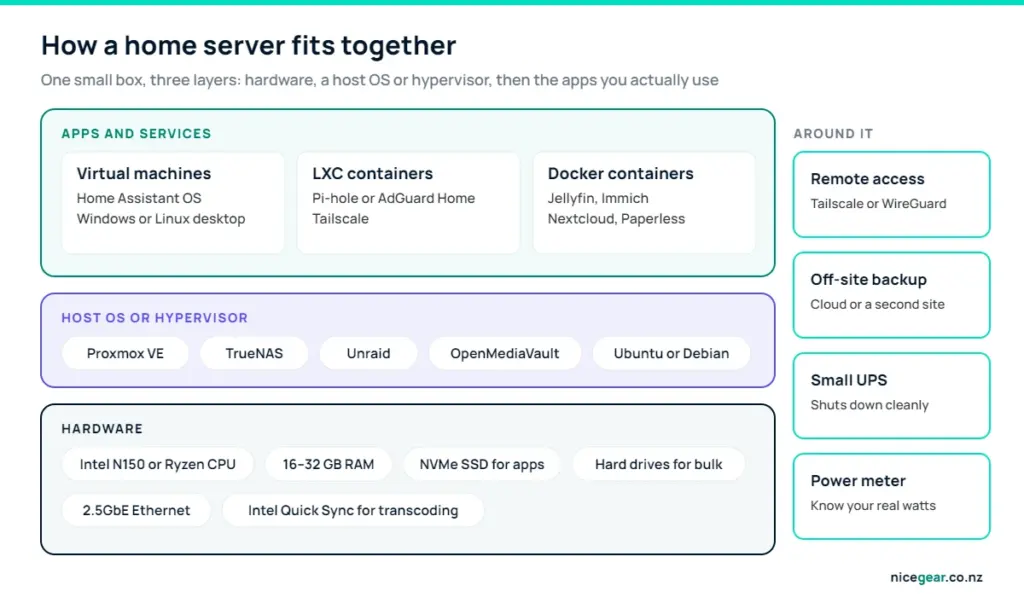
A home server is any computer that stays on and serves the rest of the house: phones back up to it, the TV streams from it, and smart-home gear talks to it. A NAS is a home server specialised for storage; a DIY home server usually does storage plus a stack of apps, often inside virtual machines or containers.
The case for one is cost and control. Several cloud subscriptions can add up to hundreds of dollars a year, while a small server costs about NZ$30 a year in power once it is paid for. The case against is maintenance: updates, backups and security are yours, and nothing is free if your time is worth something.
What to run on a home server
| App | What it replaces | RAM it needs | Difficulty |
|---|---|---|---|
| Jellyfin | Streaming your own films and shows | 2–4 GB (estimate) | Easy |
| Home Assistant OS | Cloud smart-home apps | 2 GB minimum (official) | Easy to medium |
| Pi-hole or AdGuard Home | Ad blocking on every device | Under 1 GB (estimate) | Easy |
| Immich | Google Photos or iCloud Photos | 6 GB minimum, 8 GB recommended (official) | Medium |
| Nextcloud | Google Drive, calendars and contacts | 2–4 GB (estimate) | Medium |
| Vaultwarden | A hosted password manager | Under 1 GB (estimate) | Medium |
| Minecraft server | Paid game hosting | 4–8 GB (estimate) | Easy |
Most people start with two or three of these and add more once backups are sorted. Our guide to self-hosted software for small businesses covers the office equivalents.
Home server hardware: which build fits?
Almost any computer can be a home server, but the one you buy decides your power bill for years. The four realistic tiers in NZ look like this:
| Tier | Example | NZ price (Sep 2026) | Idle draw (estimate) | Good for |
|---|---|---|---|---|
| Starter | Raspberry Pi 5 or a spare laptop | Varies | 3–15 W | Pi-hole, Home Assistant, light file sharing |
| Mini PC | Intel N150, 8–16 GB RAM | NZ$750–$900 | 6–12 W | Most households: files, Jellyfin, Home Assistant, Immich |
| Performance mini PC | Ryzen 5/7 or Core i5, 16–32 GB | NZ$1,040–$1,600 | 8–20 W | Several VMs, heavier apps, a Windows VM |
| Storage tower | DIY or used workstation, 4–8 drives | Varies | 30–60 W+ | Big media libraries with Unraid or TrueNAS |
In September 2026, PB Tech listed a fanless MINIX Z150 (N150, 8 GB) at NZ$749.80, and Elive listed a Beelink Mini S13 (N150, 12 GB) at NZ$872 and a Core i5-1235U model with 16 GB at NZ$1,039. Ex-lease business mini PCs from NZ refurbishers and Trade Me are worth a look too; our mini PC vs laptop comparison covers the trade-offs if the box doubles as a desk computer. A Raspberry Pi is a fine starter for Pi-hole or Home Assistant, ideally booting from an SSD rather than a microSD card.
Is an N100 or N150 good enough for a home server?
For most homes, yes. Intel’s N150 has four cores, a 6 W base power rating and Quick Sync video, which lets Jellyfin or Plex convert 4K video in hardware rather than on the CPU. The catch is memory: Intel lists a 16 GB maximum on a single channel, so it is not the chip for a stack of virtual machines. The older N100 behaves much the same.
Home server power consumption: what it costs to run in NZ
A server that runs 24/7 turns every watt into a yearly bill. At 35c/kWh, one watt running all year uses 8.76 kWh and costs about NZ$3.07, so the difference between a 9 W mini PC and a 50 W old tower is roughly NZ$125 a year, every year. Use the calculator with your own power price, then tick what you want to run for a hardware suggestion.
Home server running cost and hardware picker
Choose your hardware to see what it costs to run 24/7 on NZ power prices, then tick what you want to run for a sensible hardware tier.
What do you want to run? Tap all that apply.
Average draw presets are rough idle-heavy estimates for a server that spends most of its day waiting; measure yours with a plug-in energy meter or smart plug. Each extra hard drive adds about 5 W. Every watt running 24/7 costs about NZ$3 a year at 35c/kWh.
| Hardware | Average draw (estimate) | Cost per year at 35c/kWh |
|---|---|---|
| Raspberry Pi 5 | 3 W | NZ$9 |
| Intel N150 mini PC | 9 W | NZ$28 |
| Ryzen or Core i5 mini PC | 15 W | NZ$46 |
| 2-bay NAS with drives (Synology DS225+ rated 17 W in use) | 17 W | NZ$52 |
| Old desktop tower | 50 W | NZ$153 |
The cheapest watt is the one you never draw. Let hard drives spin down when idle, skip a separate graphics card unless you need it, and check the real number with a smart plug that reports energy use.
Home server OS: Proxmox, TrueNAS, Unraid or plain Linux?
The operating system matters more than the hardware for day-to-day life. Here is how the main options compare in September 2026:
| Home server OS | Cost | Best at | Storage approach |
|---|---|---|---|
| Proxmox VE 9.2 | Free, optional support subscriptions | Virtual machines and LXC containers | ZFS or LVM on local disks |
| TrueNAS Community Edition 25.10 | Free | Storage first, with Docker apps | ZFS pools |
| Unraid | US$49–$249 one-off | Mixed drive sizes, easy Docker apps | Parity array plus optional ZFS pools |
| OpenMediaVault | Free | Light NAS duties on modest hardware | Debian with RAID or mergerfs plugins |
| Ubuntu Server or Debian with Docker | Free | Full control | Anything you configure |
Proxmox VE 9.2 arrived in May 2026 on Debian 13, and it is the most flexible base: Home Assistant in one VM, Jellyfin in a container, Pi-hole in another, each with its own snapshots. Our Proxmox VE guide walks through the install. If you are new to Linux, spend a weekend with Linux Mint on a spare laptop first; the terminal will feel far less foreign.
Unraid vs TrueNAS for a storage-heavy server
Unraid lets you mix drive sizes, add one drive at a time and spin down every disk that is not being read, which suits media collectors and keeps power down. It costs US$49 (Starter, up to six storage devices), US$109 (Unleashed) or US$249 (Lifetime); the first two include a year of updates, with an optional US$36 annual extension, and the server keeps working if you do not renew.
TrueNAS Community Edition is free and built on ZFS, which checksums every block, takes instant snapshots and repairs silent corruption during scrubs. It is faster across a pool of matched drives, but it rewards planning. Choose Unraid for flexibility and low power, TrueNAS for data integrity and zero licence cost.
Home server setup: a sensible first build
Here is a build that suits most households, using an N150 mini PC with 16 GB of RAM and an NVMe SSD:
- Install Proxmox VE from a USB stick and give the host a fixed IP address on your router.
- Create a Home Assistant OS VM with 2 vCPUs and 2 GB of RAM, the official minimum. If smart home is all you want, a dedicated Home Assistant Green is simpler.
- Add an LXC container for Pi-hole or AdGuard Home and point your router’s DNS at it.
- Run Jellyfin in a container and pass through the Intel graphics for hardware transcoding. Our Jellyfin setup guide covers the details, and Jellyfin vs Plex helps if you are torn.
- Point media and backups at bulk storage, either a NAS share or a USB drive for starters.
- Schedule backups of every VM and container to the NAS, plus an off-site copy of anything irreplaceable.
- Install Tailscale for remote access, and put the server and router on a small UPS.
Snapshot before you tinker
On ZFS or LVM-thin storage, Proxmox can snapshot a VM or container in seconds. Take one before every major update or experiment, and a mistake becomes a two-click rollback.
NZ realities: power cuts, CGNAT and upload speeds
Fibre plans in NZ make remote access practical: a Fibre 300 connection usually uploads at 100 Mbps, enough for several remote 1080p streams. Starlink and some other connections use carrier-grade NAT, so port forwarding is impossible anyway; Tailscale or a similar mesh VPN works without router changes. Rural and storm-prone areas see outages, so a small UPS that tells the server to shut down cleanly is cheap insurance for your data.
Businesses have extra duties under the Privacy Act 2020 when they store client information, including keeping it secure and reporting serious breaches, which is worth reading about before you self-host anything with customer data on it.
Common home server mistakes
- Running an old gaming PC 24/7. It works, but idle draw of 50 W or more costs far more over five years than a mini PC.
- Treating RAID as a backup. RAID survives a dead drive, not a deleted folder or ransomware. Keep a separate copy off-site.
- Port-forwarding admin pages. Use a VPN such as Tailscale or WireGuard instead.
- Buying for 2031. Start with the jobs you have; mini PCs are cheap to replace and hard to outgrow in a normal house.
- Skipping documentation. Write down IP addresses, passwords (in a password manager) and how you set things up; it saves hours when something breaks.
Our verdict on home servers in NZ
Our take
- Most households: an Intel N150 mini PC with 16 GB of RAM running Proxmox VE, with bulk storage on a NAS or a USB drive to start.
- Several VMs or heavier apps: a Ryzen or Core i5 mini PC with 32 GB, which usually idles under 20 W.
- Media collectors with many drives: an Unraid tower that spins down idle disks.
- Data integrity first: TrueNAS on matched drives.
- Smart home only: skip the server and buy Home Assistant Green.
Hardware prices and software licences change often, and memory and storage prices have been volatile in 2026. Prices were checked in September 2026 and include GST unless noted. Power draw figures marked as estimates vary with hardware and settings. Nicegear is independent and has no paid placements.
Sources and further reading
- Proxmox VE roadmap and release notes – Proxmox
- Unraid OS licence pricing – Unraid
- Software releases – TrueNAS Documentation Hub
- Intel Processor N150 specifications – Intel
- Immich hardware requirements – Immich
- Alternative installation methods – Home Assistant
- Privacy Act 2020 – Office of the Privacy Commissioner
FAQs
What is the best home server for a beginner in NZ?
An Intel N150 mini PC with 12–16 GB of RAM, running Proxmox VE or a simple Linux install, is the best starting point for most people. Expect to pay roughly NZ$750–$900 in September 2026 and about NZ$30 a year in power.
How much power does a home server use?
A modern mini PC home server idles at roughly 6–20 W, while an old desktop tower can idle at 50 W or more. At 35c/kWh, each watt running 24/7 costs about NZ$3 a year.
Is Unraid or TrueNAS better for a home server?
Unraid is better if you want to mix drive sizes, add drives one at a time and keep power low, and it costs US$49–$249. TrueNAS Community Edition is free and better if you want ZFS data integrity on matched drives.
Can I use an old laptop as a home server?
Yes. An old laptop is a good first home server for Pi-hole, Home Assistant or light file sharing, because it sips power and has a built-in battery for short outages. Remove the battery if it is swelling, and avoid laptops that run hot with the lid closed.
Is an N100 good enough for a home server?
Yes, for typical household jobs such as file sharing, Jellyfin with hardware transcoding, Home Assistant and ad blocking. Its 16 GB memory limit makes it a poor choice for running several virtual machines.
Is it safe to access my home server from outside the house?
It is safe if you use a private VPN such as Tailscale or WireGuard and keep everything updated. Opening ports so admin pages face the internet is one of the easiest ways for a home server to get compromised.


