
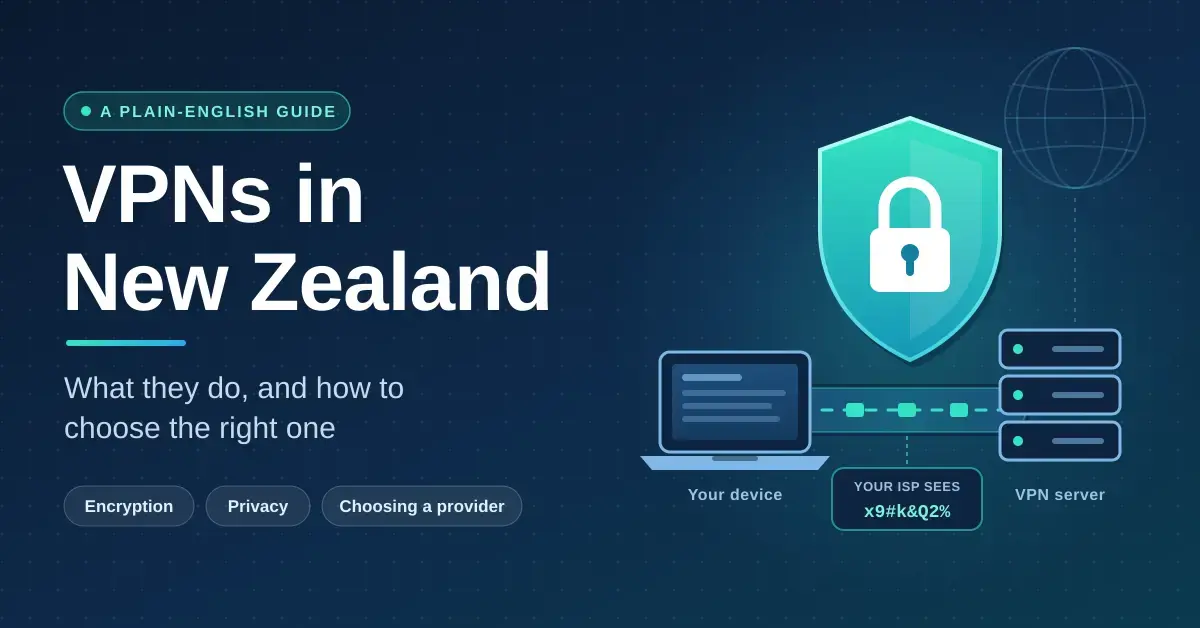
A virtual private network (VPN) is a service that encrypts your internet traffic and routes it through a server somewhere else, so your internet provider sees scrambled data instead of the sites you visit, and the sites you visit see the VPN server’s address instead of yours. In New Zealand that has two everyday uses: adding a layer of privacy on top of a connection that would otherwise be visible to your ISP, and making websites treat you as if you were in another country. This guide explains, in plain terms, what a VPN can and cannot do for someone in Aotearoa, the features worth paying attention to, how the well-known providers actually differ, the New Zealand legal context, and the mistakes that catch people out. It is an explainer, not a ranking — the aim is to help you decide whether you need one and how to judge a provider for yourself.
Key Points
- What it is: a service that encrypts your traffic and routes it through a server elsewhere, hiding your browsing from your ISP and changing your apparent location.
- Do you need one? Useful, not essential — best for public Wi-Fi safety, reaching geo-blocked content, and keeping browsing private from your ISP.
- What it can’t do: it does not make you anonymous, is not antivirus, and does not defeat logins, cookies or tracking.
- Features that matter: a kill switch, strong encryption, DNS-leak protection, a recent independent no-logs audit, and servers in or near New Zealand.
- Free vs paid: most free VPNs cap data or risk your privacy; Proton VPN’s audited free plan is the main safe exception.
- NZ law: VPNs are legal, but they give no cover for copyright infringement under the Copyright (Infringing File Sharing) Amendment Act 2011.
What a VPN actually does — and what it doesn’t
A VPN builds an encrypted “tunnel” between your device and a server run by the VPN company. Inside that tunnel your traffic is unreadable to anyone in between, including your internet service provider (ISP) and anyone snooping on the same Wi-Fi. The server then forwards your requests to the wider internet on your behalf, so the websites and apps you use record the server’s IP address rather than the one your ISP gave you.
That covers two things well: it hides the content and destinations of your traffic from your ISP and local network, and it changes your apparent location. It is the same broad category of tooling covered by the wider field of computer security, but it is only one layer, not a complete shield.
What a VPN does not do
A VPN does not make you anonymous. You are simply shifting trust from your ISP to the VPN company, which can technically see your traffic unless it genuinely keeps no logs. It does not stop websites identifying you once you log in, and it does not defeat browser cookies, fingerprinting or tracking pixels. It is also not antivirus: it will not remove malware you have already installed, though some providers bundle a basic ad and tracker blocker. Treat it as a privacy and access tool, not a cloak of invisibility.
Do New Zealanders actually need a VPN?
For most people a VPN is useful rather than essential, and the answer depends on what you are trying to achieve. New Zealand has a relatively open internet, so a VPN is not required to browse freely. Where it earns its place is in a handful of specific situations.
Privacy from your ISP and on Five Eyes concerns
New Zealand is a founding member of the Five Eyes intelligence-sharing alliance, alongside the United States, United Kingdom, Canada and Australia. That does not mean your browsing is monitored day to day, but it does mean signals-intelligence arrangements exist between those governments. Separately, your ISP can see the sites you connect to, and the Privacy Act 2020 governs how companies handle your personal data rather than what your ISP can observe. A VPN hides your browsing destinations from your ISP and local network, which is the practical privacy benefit for most users.
Public Wi-Fi safety
On open Wi-Fi at an airport, cafe or library, other people on the same network can potentially intercept unencrypted traffic. Most major sites now use HTTPS, which already encrypts a lot, but a VPN encrypts everything leaving your device, which is a sensible extra layer on untrusted networks. If you want to understand why some networks are riskier than others, our explainer on how Wi-Fi works is a good starting point.
Reaching content that is geo-blocked
Because of New Zealand’s distance and licensing deals, some streaming catalogues, sports coverage and services are limited or absent locally. Connecting through an overseas server makes those services treat you as a local visitor. The reverse is also useful: Kiwis travelling abroad often connect back to a New Zealand server to reach local services such as TVNZ+.
Speed and latency on New Zealand connections
Every VPN costs you some speed, because your data takes a detour through an encrypted tunnel and an extra server. How much you lose depends mostly on how far away the server is and which protocol you use. On a nearby server — for a New Zealander, one in Auckland or Sydney — a modern protocol typically costs only a small fraction of your line speed, and on a fast fibre plan you will still comfortably run multiple 4K streams.
The “protocol” is the method used to build the tunnel. WireGuard is the modern standard: it is fast, efficient and light on battery. NordVPN’s version of WireGuard is called NordLynx, and ExpressVPN uses its own protocol, Lightway. Older protocols such as OpenVPN are more configurable but generally slower. If a connection feels sluggish, switching protocol or picking a less-loaded, closer server usually helps more than anything else. You can measure the difference yourself with an internet speed test before and after connecting.
What a VPN means for gamers
For gaming, latency (“ping”) matters more than raw download speed. A VPN usually adds a little ping because of the extra hop, but it can occasionally lower it if your ISP’s default route to a game server is congested and the VPN takes a more direct path. It is not a guaranteed improvement, so test it for your specific game and region. For a fuller look at reducing lag, see our guide to gaming internet in New Zealand.
Streaming and geo-blocking: what works and what doesn’t
Unblocking streaming is the most common reason Kiwis buy a VPN, and it is also the least predictable. Services such as Netflix and Disney+ actively detect and block VPN traffic, so a server that works one week may be blocked the next. Providers respond with “obfuscated” servers that disguise VPN use and by rotating IP addresses, which is why the larger paid services tend to be more reliable here than small or free ones.
Be realistic about the outcome: you may need to try several servers, and no provider can promise permanent access to any particular catalogue. A few honest expectations:
- Foreign catalogues: connecting to a US or UK server can open a different Netflix, BBC iPlayer or similar library, but success varies by day and server.
- Local content while overseas: a New Zealand server lets travelling Kiwis reach services such as TVNZ+ that are otherwise blocked abroad.
- Devices without VPN apps: smart TVs, an Apple TV box and game consoles often can’t run a VPN directly; a VPN-capable router or a Smart DNS feature covers them.
- Account terms: using a VPN to access another region may breach a streaming service’s terms of use, even where it is not illegal.
Security features that matter
Beyond hiding your IP address, the features below are the ones worth checking before you subscribe. They are what separate a serious provider from a basic one.
- Kill switch: if the VPN connection drops, this instantly blocks your internet so your real IP and traffic are never exposed. Treat it as essential and confirm it is switched on.
- Strong encryption: AES-256 or ChaCha20 are the current standards, used by banks and governments.
- DNS leak protection: ensures the requests that translate website names to addresses go through the VPN, not your ISP.
- Split tunnelling: lets you send some apps through the VPN and others straight to the internet — handy for keeping a local banking app off the VPN.
- RAM-only servers: servers that store nothing to disk, so a seized server holds no data.
- Multi-hop / Double VPN: routes traffic through two servers for extra separation, at some cost to speed.
Post-quantum encryption
Some providers now offer “post-quantum” encryption, designed to resist future quantum computers that could break today’s key exchanges. This matters mainly against “harvest now, decrypt later” attacks, where data captured today is stored for future cracking. NordVPN has rolled out post-quantum protection on its NordLynx protocol across its apps, and ExpressVPN’s Lightway protocol adopted the NIST-selected ML-KEM algorithm in January 2025. It is a genuine forward step rather than a gimmick, though it is only relevant to a minority of users today.
Privacy policy and jurisdiction: reading the fine print
The single most important thing a VPN can promise is that it keeps no logs of what you do, because a provider that logs your activity is simply a new party who can see everything your ISP used to. Two factors decide how much weight that promise carries: where the company is based, and whether an independent auditor has checked its systems.
Jurisdiction affects what a company can legally be compelled to hand over. NordVPN is based in Panama and Proton VPN in Switzerland, both outside the main intelligence alliances and without mandatory data-retention laws. ExpressVPN is in the British Virgin Islands, also with lax retention rules. Surfshark, by contrast, is headquartered in the Netherlands, which is part of the wider 9/14 Eyes arrangements — so for Surfshark the independent audit record does more of the work than the location does.
Why independent audits matter more than claims
A no-logs claim is only marketing until someone checks it. Reputable providers now commission independent audits from firms such as Deloitte, PwC or KPMG to verify their systems behave as advertised. Proton VPN, for example, has passed five consecutive annual external audits of its no-logs infrastructure. When comparing providers, look for a recent, named audit and, ideally, a track record of the policy holding up in practice rather than a single one-off report.
Free versus paid VPNs
Free VPNs come with trade-offs that often defeat the point of using one. Many cap your data at a few gigabytes a month, run few servers (rarely including New Zealand), throttle speeds, and some have been caught logging or selling user data to fund themselves. If a service is free and shows no clear business model, your data may be the product.
There is one well-regarded exception. Proton VPN offers a genuinely unlimited free plan with no ads and an audited no-logs policy, funded by its paid tiers. The catch is that the free plan covers only a handful of countries, does not officially support streaming, and can be slower at busy times. It is a reasonable choice for basic privacy, but not for reliable geo-unblocking. Paid subscriptions, especially longer-term plans, are inexpensive per month and remove those limits. If budget is the concern, our roundup of password managers for your Kiwi digital life shows how a few affordable tools together do more for your security than any single product.
Covering every device in a Kiwi home
A typical household now has phones, laptops, a smart TV, a console and various smart-home gadgets. Most VPN subscriptions let you protect several devices at once on one account — commonly six to ten — while Surfshark and Private Internet Access allow unlimited simultaneous connections, which suits larger families or flats.
For devices that can’t run a VPN app themselves, you can install the VPN on a compatible router so every device on your network is covered by a single connection, or use the provider’s Smart DNS feature for streaming boxes. If you are setting this up, it helps to first get the fundamentals right — our guide to the best router settings for fast internet covers the groundwork before you add a VPN layer on top.
Copyright, torrenting and the law in New Zealand
Using a VPN is entirely legal in New Zealand. What remains illegal is anything that would be illegal without one — a VPN provides no legal cover for infringing activity. New Zealand’s file-sharing rules sit under the Copyright (Infringing File Sharing) Amendment Act 2011, which created a three-notice regime: internet providers pass on detection, warning and enforcement notices from rights holders, and repeat infringers can be taken to the Copyright Tribunal, which can award penalties of up to NZ$15,000.
Peer-to-peer (P2P) file sharing itself is a neutral technology with plenty of legitimate uses, such as distributing open-source software and large public datasets. VPN providers that advertise “P2P-optimised” servers, SOCKS5 proxy support or port forwarding are catering to that legal use. Using those features to share copyrighted material without permission does not become lawful simply because your ISP can no longer see it.
Comparing the main providers
The table below sets out the stable, checkable differences between the providers most commonly used in New Zealand — head office, whether they run servers in New Zealand, how many devices you can connect, and a standout feature — rather than promotional rankings or prices, which change constantly with promotions and are usually quoted in US dollars. Use it to shortlist, then check current pricing and a recent audit on each provider’s own site.
VPN Comparison
| Provider | Head office | NZ servers | Max devices | Standout feature |
|---|---|---|---|---|
| NordVPN | Panama | Yes (Auckland) | 10 | NordLynx protocol with post-quantum option |
| ExpressVPN | British Virgin Islands | Yes (Auckland) | 8 | Lightway protocol, post-quantum since Jan 2025 |
| Surfshark | Netherlands | Yes (Auckland) | Unlimited | Unlimited simultaneous connections |
| Proton VPN | Switzerland | Yes | 10 | Genuinely unlimited, audited free plan |
| CyberGhost | Romania | Yes | 7 | Streaming-labelled servers |
| Private Internet Access | United States | Yes | Unlimited | Open-source apps, port forwarding |
None of these is objectively “the best” for everyone: the right choice depends on whether you prioritise a nearby server for speed, unlimited devices for a busy household, a proven audit history, or a usable free tier.
Common mistakes people make with VPNs
Most disappointment with VPNs comes from a handful of avoidable errors rather than from the technology itself.
- Assuming it makes you anonymous: logging into your usual accounts still identifies you, VPN or not.
- Leaving the kill switch off: without it, a dropped connection quietly exposes your real IP address.
- Chasing free at any cost: an unknown free VPN can be worse for privacy than no VPN at all.
- Connecting to a distant server for everyday use: a far-away server slows you down; use the nearest one unless you specifically need another country.
- Expecting permanent streaming access: services block VPNs constantly, so treat unblocking as best-effort, not guaranteed.
- Never checking the audit date: a no-logs claim with no recent independent audit is just a promise.
How to choose and get started
Start by naming your main reason for wanting a VPN — privacy on public Wi-Fi, access to overseas content, or covering a whole household — because that decides which features matter. Then shortlist two or three providers, confirm each has a recent independent audit, a kill switch and servers in or near New Zealand, and check current pricing on their own websites.
Setting one up is straightforward: create an account, download the official app for your device, sign in, and use the “quick connect” button, which picks a fast nearby server automatically. Almost every reputable provider offers a money-back guarantee, so you can test real-world speed and streaming access on your own connection before committing. If an app is blocked by your firewall or antivirus, adding an exception usually resolves it.
Sources
Frequently Asked Questions (FAQ)
Is using a VPN legal in New Zealand?
Yes. Using a VPN for privacy, security or reaching geo-blocked content is entirely legal in New Zealand. A VPN does not, however, make otherwise-illegal activity legal, and it offers no protection from copyright law if you infringe.
Will a VPN slow down my internet?
It usually costs a little speed because your traffic takes a detour through an extra server. On a nearby server with a modern protocol such as WireGuard the loss is small, and on a fast fibre plan you will still stream in 4K comfortably. Distant servers cause much larger slowdowns.
Do free VPNs work for New Zealanders?
Most free VPNs cap your data, run few servers and can be a privacy risk, and they rarely unblock streaming. Proton VPN’s free plan is the notable exception, with unlimited data and an audited no-logs policy, though it covers few countries and is not built for streaming.
Can a VPN unblock overseas Netflix from New Zealand?
Sometimes, but not reliably. Streaming services actively detect and block VPNs, so a server that works today may be blocked tomorrow. Larger paid providers with obfuscated servers tend to have more success, but no provider can guarantee access to a particular catalogue.
Does a VPN make me anonymous online?
No. It hides your browsing from your ISP and changes your apparent location, but you still trust the VPN company with your traffic, and logging into accounts, cookies and browser fingerprinting can still identify you. Treat it as one privacy layer, not complete anonymity.




