
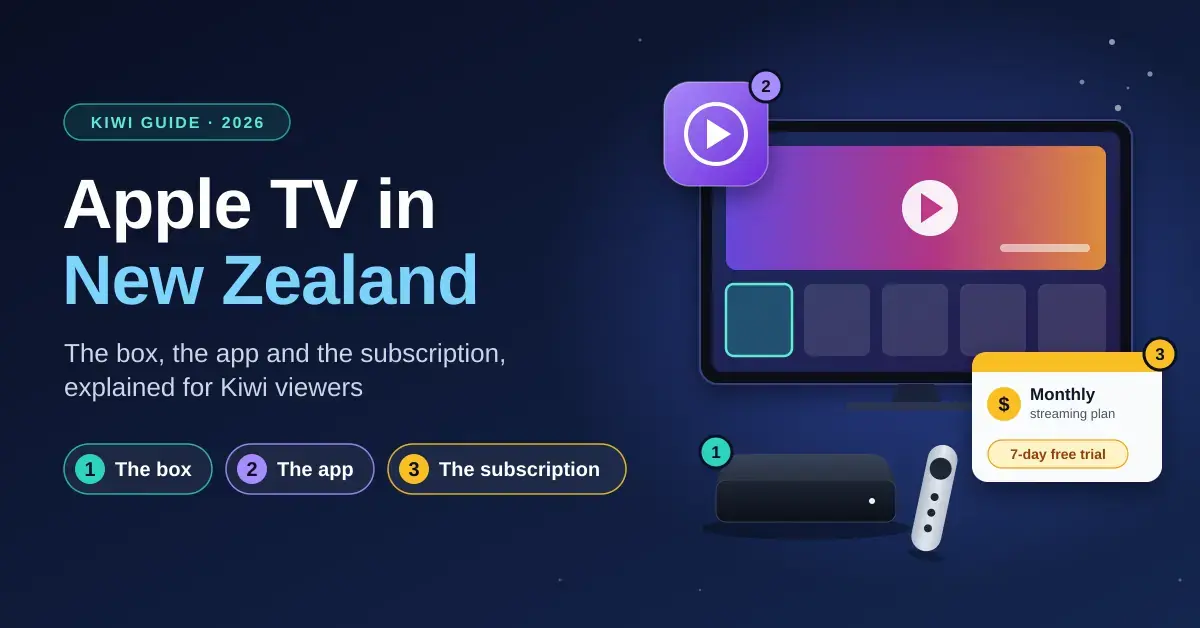
“Apple TV” is one of the most confusing product names in New Zealand tech, because it now refers to three different things at once: a small streaming box you plug into your television, an app that comes pre-installed on many devices, and a paid streaming subscription. Apple made this worse in late 2025 when it dropped the “+” and rebranded the subscription service from Apple TV+ to simply Apple TV — the same name as the box. This guide untangles all three for a Kiwi audience: what each one is, what it costs in New Zealand dollars in 2026, the specs that matter, how to set it up, and how to decide whether you actually need the box at all.
Key Points
- Three products, one name: “Apple TV” means a streaming box, a free app, and a paid subscription — all rebranded to share the name in late 2025.
- Subscription: NZ$17.99/month with a 7-day free trial; often cheaper inside an Apple One bundle.
- Box price: Apple TV 4K (3rd gen) is NZ$429 (Wi-Fi, 64GB) or NZ$529 (Wi-Fi + Ethernet, 128GB).
- You may not need the box: the app is already built into most smart TVs, consoles and rival streaming sticks.
- No live free-to-air: there is no tuner, so a Freeview box or built-in Freeview covers local live channels.
What “Apple TV” actually means in New Zealand
There are three separate products sharing the name, and knowing which one someone is talking about saves a lot of money and confusion. Think of it as a piece of hardware, a piece of software, and a content library.
Apple TV 4K — the box
The Apple TV 4K is a physical streaming box, roughly the size of a coaster, that connects to your television over HDMI. It runs Apple’s tvOS operating system and turns any TV with a spare HDMI port into a smart TV. It is the only one of the three you pay for once and own; the current model is the 3rd-generation version powered by Apple’s A15 Bionic chip.
The Apple TV app
The Apple TV app is free software that acts as a hub for streaming. It is where you browse, buy or rent films and TV, and where the subscription library lives. Crucially, the app is not limited to Apple hardware — it comes on the box, on iPhone, iPad and Mac, and also on many smart TVs, games consoles and rival streaming sticks, so you rarely need to buy anything to use it.
Apple TV — the streaming service (formerly Apple TV+)
The streaming service is Apple’s Netflix-style subscription of original shows and films — titles such as Ted Lasso, Severance, The Morning Show and Silo. Until late 2025 it was branded Apple TV+; Apple has since renamed it to just Apple TV with a new colourful logo. It is a monthly subscription and is entirely separate from the box: you can pay for the service without ever owning Apple hardware, and you can own the box without paying for the service.
What does the Apple TV subscription cost in New Zealand?
The Apple TV streaming service costs NZ$17.99 per month in New Zealand as of 2026, following a price rise in 2025. New subscribers get a seven-day free trial, and anyone who buys an eligible new Apple device can redeem three months free within 90 days of purchase. Apple also offers an annual plan that works out cheaper than paying month to month. One subscription covers your whole household through Family Sharing, so you are not paying per person.
If you already use other Apple services, the Apple One bundle is often better value than paying for each one separately. It rolls the Apple TV service in with Apple Music, Apple Arcade and iCloud+ storage, saving up to around 39% versus buying them individually:
| Apple One plan | Monthly price (NZ) | What’s included |
|---|---|---|
| Individual | NZ$29.95 | Apple TV, Apple Music, Apple Arcade, 50GB iCloud+ |
| Family (up to 5 people) | NZ$42.95 | Everything above, plus 200GB iCloud+, shareable |
| Premier (up to 5 people) | NZ$59.95 | Everything above, plus Apple Fitness+ and 2TB iCloud+ |
Because the app lives inside Apple’s wider ecosystem, the same Apple ID that pays for the subscription also unlocks the App Store on your iPhone and iPad, home to everything from banking to fitness apps to the best casino apps in NZ. The Apple TV app itself, though, stays focused on video.
How much is the Apple TV 4K box, and what do you get?
The Apple TV 4K box is sold in two versions on Apple’s New Zealand store. Both use the same A15 Bionic chip and the same rechargeable Siri Remote; the difference is storage and a network port.
Quick Facts
| Developer | Apple Inc. |
|---|---|
| Official product page | apple.com/nz/apple-tv-4k |
| Hardware | Apple TV 4K (3rd generation, 2022), A15 Bionic chip |
| Operating system | tvOS |
| Storage / network | 64GB (Wi-Fi) or 128GB (Wi-Fi + Gigabit Ethernet, Thread) |
| Video / audio | 4K60 Dolby Vision, HDR10+, HDR10, HLG; Dolby Atmos; HDMI 2.1 |
| Box price (NZ) | NZ$429 (64GB) / NZ$529 (128GB) |
| Subscription (NZ) | NZ$17.99/month, 7-day free trial (3 months free with a new device) |
| Also runs on | Smart TVs, PlayStation, Xbox, Fire TV, Google TV, Roku, iPhone, iPad, Mac |
- Wi-Fi, 64GB — NZ$429: Wi-Fi 6 only, no wired network socket. Fine for most streaming.
- Wi-Fi + Ethernet, 128GB — NZ$529: adds a Gigabit Ethernet port and support for Thread, the low-power mesh protocol used by smart-home gadgets.
Both models output up to 4K at 60 frames per second with Dolby Vision, HDR10+, HDR10 and HLG high-dynamic-range formats, and pass through Dolby Atmos surround sound. Connectivity is HDMI 2.1, Wi-Fi 6 and Bluetooth 5.0. Beyond video, the box doubles as a smart-home hub: it supports Apple’s HomeKit and the cross-brand Matter standard, so it can quietly run your smart lights, plugs and sensors even when you are not watching anything.
The A15 chip is the same generation as the one in the iPhone 13, which is overkill for streaming but keeps the interface fast and enables Apple Arcade gaming on the big screen. The included Siri Remote charges over USB-C and lasts months between charges.
Do you actually need the Apple TV box?
For many New Zealanders the honest answer is no, because the Apple TV app is already built into the device they own. Before spending NZ$429 or more, check whether you already have the app on:
- A recent smart TV — most Samsung, LG, Sony, TCL and Hisense sets from the last few years include the Apple TV app.
- A games console — PlayStation 4/5 and Xbox One/Series consoles all run it.
- A rival streaming stick — Amazon Fire TV, Google TV/Chromecast and Roku devices carry it too.
- An iPhone, iPad or Mac, with AirPlay to throw it onto a bigger screen.
The box earns its price in specific situations: you want the fastest, most polished interface; you have an older “dumb” TV or a smart TV whose software has become sluggish; you are deep in the Apple ecosystem and want AirPlay, Fitness+ on the TV, and a HomeKit hub in one device; or you care about wired Ethernet and Thread for a reliable smart home. If none of that applies, the free app on your existing gear does the same streaming job.
Apple TV 4K vs other streaming options in New Zealand
Apple’s box is premium-priced against the competition, and it does not do everything — notably, it has no built-in tuner for local free-to-air channels. If live New Zealand television matters to you, a Freeview box or a smart TV with Freeview built in covers that gap. Here is how the main streaming devices compare:
| Device | Approx. NZ price | Max quality | Best for |
|---|---|---|---|
| Apple TV 4K (3rd gen) | NZ$429–$529 | 4K Dolby Vision / Atmos | Apple households, HomeKit hub, fastest interface |
| Google TV Streamer / Chromecast | NZ$60–$180 | 4K Dolby Vision / Atmos | Android/Google users, Chromecast built in, low cost |
| Amazon Fire TV Stick 4K | NZ$80–$120 | 4K Dolby Vision / Atmos | Cheapest 4K stick, Alexa voice |
| Roku streaming players | NZ$70–$150 | 4K HDR | Simple, neutral interface across all apps |
| Freeview box / built-in TV app | NZ$0–$200 | 1080p (broadcast) | Live NZ free-to-air channels and catch-up |
If your interest is playing your own downloaded files or building a personal library rather than paying for subscriptions, that is a different job again — the VLC media player handles almost any file format, and a Jellyfin or Plex server lets you stream your own collection to any screen in the house.
How to set up Apple TV in New Zealand
Getting started depends on which “Apple TV” you mean. To start the subscription, open the Apple TV app on any device, sign in with your Apple ID, and choose Start Free Trial — no hardware purchase required. To set up the box:
- Plug the Apple TV 4K into a spare HDMI port on your TV and connect the power lead.
- Switch your TV to that HDMI input and turn the TV on.
- Bring an unlocked iPhone or iPad close to auto-fill your Apple ID and Wi-Fi details, or enter them manually with the Siri Remote.
- Sign in with your Apple ID (or create one) so your subscriptions and purchases follow you.
- Run a quick broadband speed test if 4K stutters — Apple recommends a solid connection, and the Ethernet model helps on flaky Wi-Fi.
A stable connection matters more than raw speed for smooth 4K. Apple suggests around 25 Mbps for 4K playback; if several people stream at once, wired Ethernet or a strong mesh signal keeps things buffer-free.
Getting the picture and sound right
To actually see the 4K, Dolby Vision and Dolby Atmos the box supports, the rest of your setup has to keep up. The box can only pass along what your television and speakers can display and play.
- Screen: you need a 4K TV with HDR (Dolby Vision or HDR10) to benefit from the top picture modes; on a 1080p TV the box still works but downscales.
- Cable and port: use a High Speed / Ultra High Speed HDMI cable and plug into an HDMI port that supports 4K HDR — on some TVs only certain ports do.
- Sound: Dolby Atmos needs a compatible soundbar or AV receiver, usually connected via an HDMI eARC port so the audio can travel back out of the TV.
- Calibration: tvOS includes a colour-balance tool that uses an iPhone to match the box’s output to your screen.
Apple TV accessibility features
Apple builds a strong set of accessibility tools into tvOS so the box can be used by people with vision, hearing or motor differences. VoiceOver reads on-screen items aloud, Zoom magnifies the interface, and colour filters and increased contrast help low-vision users. For hearing, there are full subtitles and closed captions, plus support for Made for iPhone hearing aids and audio streamed privately to AirPods.
The Siri Remote can be driven by voice, and the box supports switch control and third-party adaptive controllers for people who cannot use the standard remote. These features are free and built in, not add-ons.
Common mistakes to avoid
Most Apple TV regret in New Zealand comes down to a handful of avoidable errors:
- Buying the box when your TV already has the app. Check your smart TV or console first; you may be about to pay NZ$429 for something you already have.
- Confusing the box with the subscription. Buying the box does not include the streaming service beyond the three-month trial, and paying for the service does not require the box.
- Expecting live NZ free-to-air channels. The box has no tuner — there is no TVNZ 1, Three or built-in Freeview live TV without separate apps or a Freeview device.
- Plugging into the wrong HDMI port. Using a non-4K/HDR port silently caps your picture quality.
- Paying monthly for several Apple services. If you already use Apple Music and iCloud+, Apple One usually costs less than the sum of the parts.
- Choosing the 64GB model then wanting Ethernet. Only the 128GB version has the wired port and Thread — decide before you buy, not after.
Who is Apple TV best for?
The streaming service suits anyone who wants a small, high-quality catalogue of originals rather than a huge back-catalogue, and it is easy to dip into on a device you already own. The Apple TV 4K box is best for households already using iPhones, iPads and Apple Music who want the slickest interface, AirPlay from their phones, a HomeKit smart-home hub and top-tier Dolby Vision and Atmos output — and who do not mind paying a premium over a NZ$80 streaming stick. If you mainly watch free-to-air, want the cheapest 4K option, or already have the app built into your TV, one of the alternatives above will serve you just as well for less.
Sources
- Apple (NZ) — Buy Apple TV 4K (prices)
- Apple (NZ) — Apple TV 4K technical specifications
- Apple (NZ) — Apple TV streaming service and pricing
- Apple (NZ) — Apple One bundle plans and prices
- Variety — Apple TV+ rebrands to Apple TV
- Flicks NZ — Apple TV pricing and availability in New Zealand
- MoneyHub NZ — Apple TV review and cost breakdown
Frequently asked questions (FAQ)
Is Apple TV+ the same as Apple TV now?
Yes. In late 2025 Apple rebranded its streaming subscription from Apple TV+ to simply Apple TV, so the service, the app and the box all share the name. When people say “Apple TV” they could mean any of the three, which is why it pays to check whether they are talking about the subscription, the software or the physical box.
How much does Apple TV cost per month in New Zealand?
The Apple TV streaming service is NZ$17.99 per month, with a seven-day free trial for new subscribers and three months free if you buy an eligible new Apple device. An annual plan and the Apple One bundle can both lower the effective cost, and one subscription covers your whole household.
Do I need to buy the Apple TV box to watch Apple TV?
No. The Apple TV app is free and comes on most recent smart TVs, on PlayStation and Xbox consoles, on Fire TV, Google TV and Roku devices, and on iPhone, iPad and Mac. You only need the box if you want its faster interface, HomeKit hub features or the highest-quality Dolby Vision and Atmos output on a TV that lacks the app.
Can Apple TV show live New Zealand TV channels?
Not on its own. The Apple TV 4K has no broadcast tuner, so it cannot receive live free-to-air channels like a Freeview box does. You can install catch-up apps such as TVNZ+ and ThreeNow from the App Store, but for live local channels you still need a Freeview device or a TV with Freeview built in.
What is the difference between the 64GB and 128GB Apple TV 4K?
Both share the same A15 chip and picture quality. The 64GB model is Wi-Fi only at NZ$429, while the 128GB model at NZ$529 adds a Gigabit Ethernet port and Thread support for smart-home devices. The extra storage mainly helps if you install a lot of games; most people choose based on whether they want the wired network port.




