
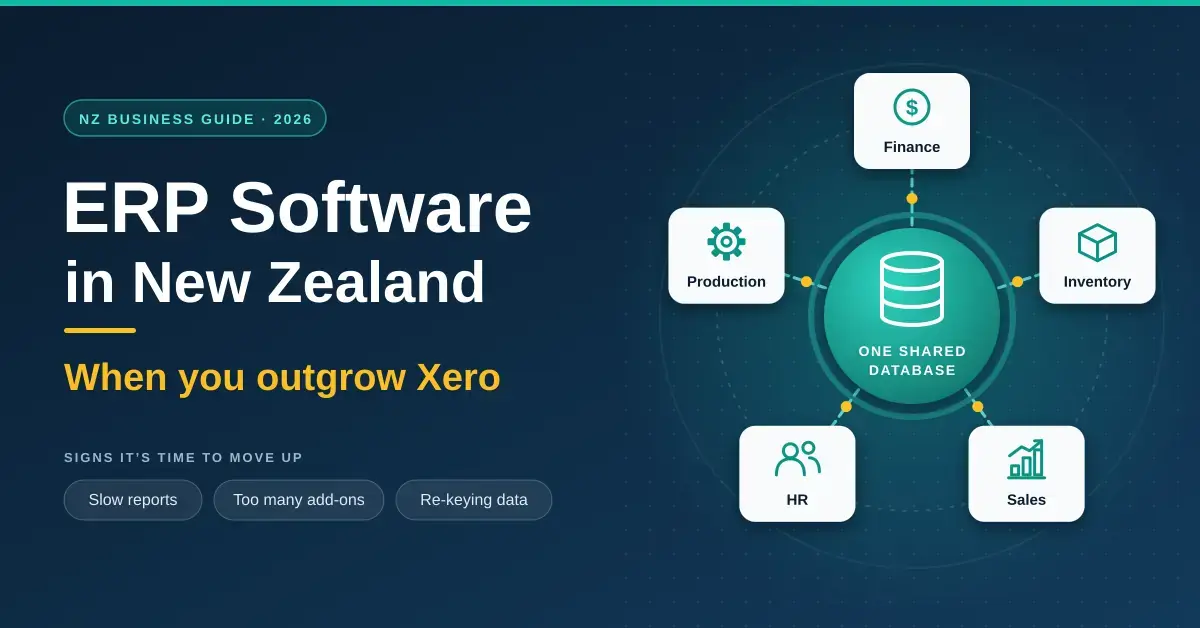
Enterprise resource planning (ERP) software ties a company’s core systems — finance, supply chains, production, and human resources — into one shared database, so every team works from the same live numbers instead of emailing spreadsheets back and forth. For most New Zealand businesses the real question is not whether ERP is powerful, but whether they have grown enough to need it. This guide explains what ERP is, how it works, the clear signs you have outgrown an accounting package like Xero, what a system realistically costs here in 2026, and the questions worth asking before you sign anything.
Key Points
- ERP in one line: one shared database that runs finance, inventory, sales, HR and production together, instead of separate apps that sync.
- ERP vs accounting: Xero and MYOB track money; ERP adds operations. ERP is the business’s operating system, not just its books.
- Signs you have outgrown Xero: slow reports, several bolted-on add-ons, re-keying the same data, complex inventory, multiple entities, and spreadsheets filling the gaps.
- Systems NZ businesses shortlist: MYOB Acumatica, Oracle NetSuite, Microsoft Dynamics 365 Business Central, SAP Business One and open-source Odoo.
- Cost (2026, indicative): subscriptions from about US$80 per user per month; implementation often NZ$30,000-150,000+; budget for ongoing support too.
- Timeline: most mid-market rollouts take 3-12 months.
What is ERP software?
ERP software is a single system that manages a business’s day-to-day operations by connecting departments that would otherwise run separate tools. Instead of one app for accounting, another for inventory, a spreadsheet for purchasing and a fourth system for payroll, an ERP keeps all of that in one place, working from the same records. That shared foundation is the whole point: it cuts duplicate data entry, reduces errors and lets people across the business see the same information at the same time.
The appeal is a little like a well-designed card game. UNO works because one small, shared rulebook — the kind set out plainly on unorules.nz — keeps every player in sync without anyone having to re-explain the basics each turn. An ERP does the same for a company: one agreed set of records and rules, so finance, sales and the warehouse are never arguing about whose numbers are right.
It helps to be clear about the difference between ERP and accounting software. Accounting tools such as Xero, MYOB Business or QuickBooks track money — invoices, bank feeds, GST and the general ledger. ERP includes that accounting core but adds operations: inventory, manufacturing, purchasing, customer relationships, projects and people. ERP is the operating system for the whole business, not just its books.
How does an ERP system work?
An ERP works by putting every part of the business onto one central database that updates in real time. When something happens in one department, the rest of the organisation sees it immediately, because there is only one copy of the truth.
A simple order shows the chain reaction. When a salesperson enters an order, the system checks available stock, reserves it, and flags the warehouse to pick and pack. Inventory levels drop automatically. If stock falls below a reorder point, a purchase order can be raised to the supplier. Finance sees the invoice, the revenue and the cost of goods sold without re-keying anything, and management can report on margin by product or customer the same day. Because each step draws on the same records, the risk of mismatched numbers and double entry largely disappears.
Signs you have outgrown Xero
You have likely outgrown your accounting package when the workarounds start costing more time than the software saves. Xero and its peers are excellent for early-stage and single-entity businesses, but they were built to do the books, not to run complex operations. The following signs are the ones New Zealand advisers see most often:
- Reports slow down or time out. As transaction volumes climb, a system built for accounting rather than heavy operational data starts to lag — a common early warning that you have outgrown it.
- You run several add-ons bolted together. An inventory app, a CRM, a point-of-sale tool and a payroll system all syncing to your accounts through connectors is a patchwork that breaks and needs babysitting.
- People re-key the same data. If the same order or customer detail is typed into two or three systems, you are paying for duplicate work and inviting mistakes.
- Inventory and manufacturing get complex. Multiple warehouses, batch or serial tracking, assemblies, bills of materials or landed costs quickly exceed what a basic accounting package handles.
- You have multiple entities or currencies. Several companies, branches, or foreign-currency trading make consolidated reporting painful in a single-entity tool.
- Spreadsheets fill the gaps. When critical reporting, forecasting or stock planning lives in spreadsheets outside the system, the system is no longer running the business.
One or two of these is normal. Several of them together is the point at which a cloud ERP usually pays for itself.
What ERP actually replaces
ERP replaces the tangle of separate apps that a growing business accumulates. In practice that usually means folding the accounting ledger, a stand-alone inventory or order-management tool, a CRM, purchasing spreadsheets and sometimes payroll into one system. The benefit is not just fewer logins; it is that the connections between those functions become automatic rather than manual.
ERP does not have to replace everything, though. Many businesses keep a specialist tool — a dedicated e-commerce platform, a payroll bureau, or a trade-specific job app — and integrate it with the ERP rather than forcing a single system to do a job it does poorly. If you are weighing whether to run systems in-house or lean on cloud services, our guide to self-hosted software for a small business covers the trade-offs that also apply to ERP hosting.
The core modules inside an ERP
Most ERP platforms are built from modules you switch on as you need them. Understanding the modules helps you buy only what you will use.
Finance and accounting
The ledger at the centre of every ERP: accounts payable and receivable, the general ledger, GST and tax, fixed assets, budgeting and consolidated reporting across entities. This is the part that overlaps with — and ultimately replaces — Xero or MYOB.
Inventory and supply chain
Stock across multiple locations, reorder points, batch and serial tracking, purchasing, supplier management and landed costs. This is the module that most often drives the move to ERP, because inventory complexity is where accounting software runs out of road.
Sales, CRM and orders
Quotes, sales orders, customer records and pipeline, with order status flowing straight through to stock and invoicing. Keeping customer data inside the ERP avoids the sync problems of a bolt-on CRM.
People and payroll
Employee records, leave, timesheets and payroll — either built in or integrated with a specialist NZ payroll product that handles local rules such as the Holidays Act.
Manufacturing and projects
Bills of materials, production scheduling and job costing for makers, and project budgets, time and billing for services firms. These heavier modules are usually where premium editions earn their price.
Popular ERP systems for New Zealand businesses
The systems Kiwi businesses shortlist most often range from locally tailored mid-market platforms to global enterprise suites and open-source options. The table below compares the main contenders on who they suit, how they are deployed and indicative 2026 pricing. Treat the prices as starting points — nearly every ERP is quoted to your business after a scoping conversation, and the licence is only part of the total.
ERP System Comparison
| System | Best suited to | Deployment | Indicative 2026 pricing |
|---|---|---|---|
| MYOB Acumatica | Mid-sized AU/NZ businesses (20-1,000+ staff) | Cloud, via NZ partner | Billed by usage tier in NZD/AUD; unlimited users |
| Oracle NetSuite | Larger or multi-entity, e-commerce and retail | Cloud | Annual platform fee + ~US$99-130+/user/month; quoted |
| Dynamics 365 Business Central | SMBs already using Microsoft 365 | Cloud | Essentials US$80, Premium US$110/user/month (list) |
| SAP Business One | Small to mid-sized firms wanting the SAP ecosystem | Cloud or on-premise | Quoted via partner; per-user licensing |
| Odoo | Technical or cost-focused teams wanting open source | Cloud or self-hosted | Free Community edition; paid plans per user |
| Cin7 Core | Inventory-heavy businesses bridging from Xero | Cloud | From about US$349/month |
| Katana | Makers needing production planning | Cloud | From about US$299/month |
Open-source platforms such as Odoo deserve a mention for smaller or more technical teams, because they can be self-hosted to keep data in-house and avoid per-user fees. The same reasoning that makes people choose open-source alternatives to Microsoft Office — control, cost and no lock-in — applies to ERP, though you trade that for taking on more of the setup and maintenance yourself.
What does ERP cost in New Zealand?
ERP cost in New Zealand has three parts: the software subscription, a one-off implementation fee, and ongoing support. Budgeting for only the first is the most common planning mistake.
Subscriptions. Per-user cloud pricing is published for some systems and quoted for others. Microsoft Dynamics 365 Business Central lists at US$80 per user per month for Essentials and US$110 for Premium (Microsoft’s US list price after its 1 November 2025 increase), plus US$8 for lighter “Team Members” access. Oracle NetSuite does not publish prices: a quote is built from an annual platform licence (commonly in the tens of thousands of dollars a year for mid-market editions), roughly US$99–US$130+ per full user per month, optional modules, and implementation. MYOB Acumatica is unusual in charging by resource tier and transaction volume rather than per user — so you can give unlimited staff access — and bills in NZD or AUD through its partner channel.
Implementation. This is the big variable. International cost research puts a small-business rollout (roughly 10–25 users) at around US$25,000–US$45,000, a growing SMB at US$45,000–US$90,000, and mid-market projects at US$90,000–US$150,000 or more. In New Zealand these projects are usually delivered by a local implementation partner and quoted in NZD; the figure covers configuration, data migration, integrations and training.
Ongoing. Budget for annual support, updates and occasional extra configuration as the business changes. For context on the wider toolkit that sits around an ERP, our rundown of the home-office software stack for New Zealand shows where everyday apps still fit alongside a bigger system.
How to choose the right ERP
Choose an ERP by matching it to your size, industry and growth plan rather than to a feature list. A handful of factors decide most shortlists:
- Business size and complexity. Larger or multi-entity businesses need the depth of NetSuite or MYOB Acumatica; a simpler operation may be well served by Business Central or an inventory-focused tool.
- Industry fit. Manufacturers, wholesalers, retailers and services firms each have different must-haves — check the system handles yours out of the box rather than through heavy customisation.
- Scalability. The system should cope with more users, products and transactions without a re-platform in two years’ time.
- Ease of use. Staff adoption makes or breaks a rollout; a system people find clear is worth more than one with every feature.
- Integrations. Confirm it connects cleanly to the tools you are keeping — your e-commerce platform, NZ payroll, or banking.
- Local support. A New Zealand implementation partner who knows GST, the Privacy Act and local payroll rules is worth seeking out.
The implementation process
An ERP implementation runs through a predictable sequence, and most New Zealand mid-market projects take between three and twelve months depending on scope. The stages are:
- Needs assessment. Document your processes and must-have requirements, then match them to a shortlist of systems and partners.
- Configuration. Set the system up to reflect how your business actually works — your chart of accounts, workflows, tax settings and user roles.
- Data migration. Data migration is a critical step: customers, suppliers, stock and opening balances must be moved across cleanly and checked for accuracy, because errors here follow you for years.
- Training. Get staff comfortable before go-live, not after — adoption is where projects succeed or stall.
- Go-live and support. Switch over (often in a quiet period), then lean on vendor and partner support as issues surface in the first weeks.
Common mistakes to avoid
Most failed ERP projects fail for the same handful of reasons, not because the software was wrong. Watch for these:
- Budgeting only for licences. Implementation, migration and support often cost more than the first year of subscriptions combined.
- Over-customising. Bending the software to match every quirk of your current process makes upgrades painful and expensive; adapt your process where it is sensible to.
- Migrating dirty data. Moving years of duplicate customers and dead stock into a clean system just recreates the mess — clean up first.
- Underinvesting in training. A powerful system no one uses properly is worse than the simple tools it replaced.
- Moving too early. If a growing pain can be solved with a single add-on or a tidier process, you may not need an ERP yet.
Security, privacy and compliance
An ERP holds some of your most sensitive data — customer details, payroll, financials — so security and privacy sit at the centre of the decision, not the end of it. Reputable platforms provide encryption, role-based access control, audit logs and regular updates, and reputable cloud vendors run data centres with strong physical and network security.
In New Zealand, any system holding personal information must meet the Privacy Act 2020, which sets rules for collecting, storing, securing and disclosing that data, including when information is held offshore. Ask any cloud ERP vendor where your data is stored and how breaches are notified. On the practical side, strong, unique logins matter: a shared or weak admin password undoes a lot of built-in security, which is why a password manager is a sensible baseline for every staff account. Schedule regular backups and periodic reviews so the system stays secure and current as it grows.
Who ERP suits — and who should wait
ERP suits businesses whose operations have outgrown their books — typically those juggling real inventory, multiple entities, a growing headcount and a stack of disconnected apps. If reporting is slow, people re-key data and spreadsheets are holding the business together, the investment usually pays back in time saved and errors avoided.
You should wait if a single accounting package plus one or two well-chosen apps still does the job. A smaller or simpler business is often better served by sticking with Xero and adding a focused inventory or CRM tool, and there is plenty of capable free business software that can delay the jump for another year or two. ERP is a tool for the complexity you actually have, not the complexity you imagine you might.
Sources
- eCommerceNews NZ — Outgrown Xero? The signs it’s time to upgrade to a cloud ERP
- Microsoft — Dynamics 365 Business Central (NZ)
- ERP Research — Business Central Pricing 2026
- Oracle NetSuite — official site
- MYOB Acumatica (NZ)
- Xero NZ — Cin7 inventory partnership
- IBM — What is data migration?
- Office of the Privacy Commissioner — Privacy Act 2020
Frequently asked questions (FAQ)
Is Xero an ERP system?
No. Xero is cloud accounting software that manages your books — invoicing, bank reconciliation, GST and reporting. An ERP includes that accounting core but adds operations such as inventory, manufacturing, purchasing, CRM and payroll in one connected system. Many New Zealand businesses start on Xero and move to an ERP once their operations outgrow what an accounting package can do.
How much does ERP software cost in New Zealand?
It depends on size and system, and the total has three parts. Subscriptions run from roughly US$80 per user per month for Microsoft Dynamics 365 Business Central Essentials up to US$100-plus for larger platforms, while MYOB Acumatica charges by usage tier instead of per user. On top of that, implementation for a small-to-mid business commonly lands in the tens of thousands of dollars, plus ongoing support. Always get a quote scoped to your business.
How long does an ERP implementation take?
Most mid-market New Zealand projects take three to twelve months, depending on how many modules you switch on, how much data you migrate and how much the system is customised. A straightforward rollout for a small team can be quicker; a complex, multi-entity manufacturer takes longer. Rushing the data migration and training stages is the fastest way to blow the timeline.
What is the best ERP for a small New Zealand business?
There is no single best system — it depends on your industry and complexity. MYOB Acumatica is the most locally tailored mid-market option for Australia and New Zealand, Microsoft Dynamics 365 Business Central suits businesses already in the Microsoft ecosystem, NetSuite fits larger or multi-entity operations, and Odoo is worth a look for technical teams wanting open-source control. Shortlist two or three and compare them against your must-haves.
Do I need to replace Xero completely to use an ERP?
Usually yes for the accounting function, because the ERP’s finance module becomes your ledger and running two systems defeats the purpose. However, you can keep specialist tools — a dedicated e-commerce platform or NZ payroll product, for example — and integrate them with the ERP rather than forcing one system to do everything. The goal is one source of truth, not necessarily one single app.




