
The right smart lock NZ homes need depends on the door, not the app. Most timber doors with a deadbolt take a retrofit smart deadbolt such as the Eufy Smart Lock C34 ($299), while aluminium joinery needs a narrow-stile smart mortice such as the Yale Unity Slim ($999–$1,098), prices checked September 2026. This guide is for homeowners and renters choosing a digital or electronic door lock.
A smart lock is one layer of a wider security setup, so it pairs well with door sensors and a camera; our smart home security systems guide covers the rest, and the beginner’s guide to smart home devices explains the basics.
Key takeaways
- Identify your door and lock first: deadbolt, mortice or narrow-stile aluminium joinery each need a different style of smart lock.
- Retrofit smart deadbolts start around $299; digital mortice locks run $700 and up; aluminium joinery models about $1,000.
- Most smart locks fit doors 35–60 mm thick; measure the backset before you buy.
- Batteries last months, not years. Pick a lock with a key override or emergency USB-C power.
- Renters need the landlord’s written consent to change a lock.
In this guide
- Smart lock vs digital door lock vs electronic door lock
- Which smart door lock fits NZ doors?
- Smart lock fit checker
- Smart lock NZ buying guide: the best models for 2026
- Smart lock installation NZ: DIY or locksmith?
- Batteries, outages and lock-outs
- Are smart locks secure?
- Smart lock for rental properties
- Common mistakes
Smart lock vs digital door lock vs electronic door lock
The terms overlap, and NZ retailers use them loosely. Every smart lock is electronic, but not every electronic lock is smart.
| Term | What it usually means | Connectivity | Example sold in NZ |
|---|---|---|---|
| Electronic door lock | A motorised lock opened by a code, card or fob instead of only a key | Often none | Keypad and card access locks |
| Digital door lock | A keypad or PIN lock, often a mortice lock with a keypad | Sometimes Bluetooth, or “smart-ready” modules | Yale YDM3109A digital mortice ($730) |
| Smart lock | An electronic lock with app control, access logs and remote access | Bluetooth, Wi-Fi, Matter, Zigbee or Z-Wave | Eufy C34 ($299), Yale Unity Slim |
Choosing a digital or electronic door lock in NZ
If you only want keyless entry, a keypad-only digital lock does the job without an app or account. If you want to let people in remotely, get alerts or see who came and went, you need a smart lock. Either way, the fit rules below are the same, so start with the door.
“Smart-ready” is worth decoding: Yale uses it for locks that work as keypad locks out of the box and become app-controlled when you add a Yale module and, for control away from home, a hub.
Which smart door lock fits NZ doors?
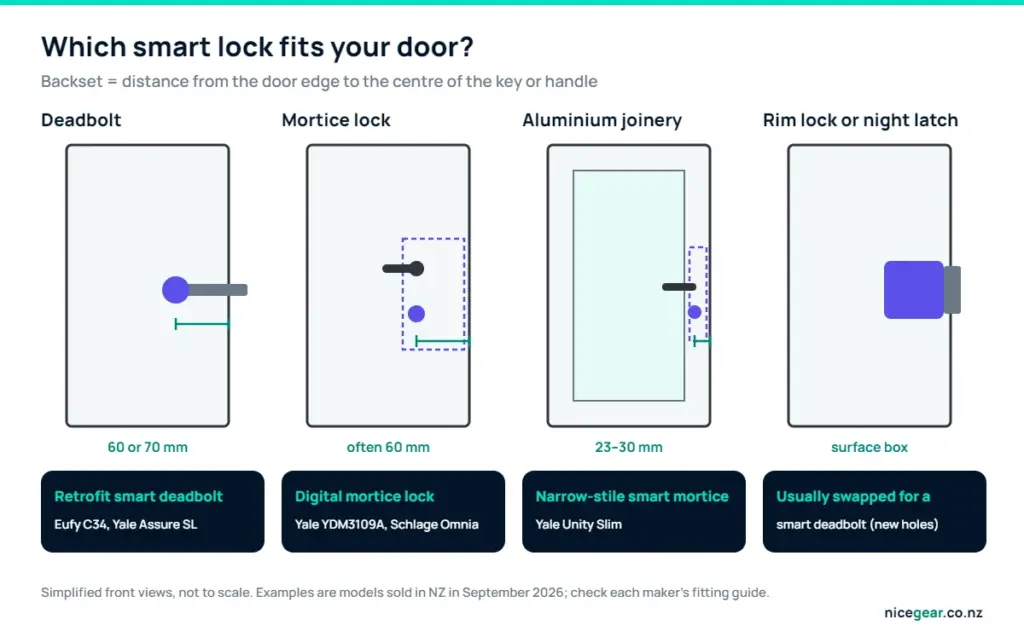
Two measurements decide most of it. The backset is the distance from the door edge to the centre of the key or handle, and the door thickness is usually 35–60 mm for the locks below.
Timber doors with a deadbolt
The easiest upgrade. A deadbolt with a 60 or 70 mm backset can take a retrofit smart deadbolt that uses the existing holes, often in under an hour with a screwdriver.
Timber doors with a mortice lock
A mortice lock sits in a pocket cut into the door, with the handle and cylinder on the same plate. A digital mortice lock replaces the lock body and handles, so the new lock has to match your pocket and backset, and a locksmith is usually the right person to fit it.
Aluminium joinery doors
Common on NZ homes built since the 1970s, aluminium doors have narrow frames and short backsets, often 23–30 mm, and standard smart deadbolts won’t fit. Yale lists the Unity Slim for aluminium joinery with 30–60 mm backset options and 35–60 mm doors.
Ranch sliders and security screen doors
Most smart locks are made for hinged doors. For sliders, keep the mechanical lock, add a door sensor and put the smart lock on your main entry door. Security screen doors need screen-door-specific locks; ask a locksmith or your screen installer.
Smart lock fit checker
Answer six questions to see which style of lock suits your door and who should fit it.
Smart lock fit checker
Describe your door and current lock to see which style of smart lock fits, with example models sold in NZ.
Examples and prices from NZ retailers and Yale NZ in September 2026: Eufy Smart Lock C34 $299, Yale Assure Lock SL deadbolt $377, Yale YDM3109A digital mortice $730, Yale Unity Slim for aluminium joinery $999–$1,098, Schlage Omnia fire-rated smart mortice (price through suppliers). Always check the maker’s fitting guide.
Smart lock NZ buying guide: the best models for 2026
| Lock | Type | Opens with | Connects via | NZ price (Sep 2026) | Best for |
|---|---|---|---|---|---|
| Eufy Smart Lock C34 | Retrofit deadbolt | Keypad, app, key | Wi-Fi built in; Matter | $299 at Noel Leeming | Timber deadbolt doors |
| Yale Assure Lock SL | Keyless digital deadbolt, smart-ready | Touch keypad; app with a Yale module | Module needed | $377 at Bunnings | Deadbolt doors in a Yale setup |
| Yale Assure Lock lever | Keyed digital lever lock, smart-ready | Keypad, key | Module needed | $412 at Bunnings | Doors with lever handles |
| Yale YDM3109A | Digital mortice lock, smart-ready | PIN, card, key, app | Bluetooth | $730 at Yale NZ | Timber mortice doors |
| Yale Unity Slim | Narrow-stile smart mortice | Keypad, app, opens as you arrive | Bluetooth; Wi-Fi with Yale’s hub | $999–$1,098 at Yale NZ | Aluminium joinery |
| Schlage Omnia | Fire-rated smart mortice | PIN, fingerprint, app | Bluetooth; Wi-Fi via bridge | Through hardware suppliers | Apartments and fire doors |
Several Yale models showed as out of stock on Yale’s NZ store when we checked, so stock and prices move around.
Yale smart lock NZ range
Yale is one of the most widely stocked brands here. The Unity Slim, part of the Yale Unity NZ range, uses a four-point locking mortice for aluminium joinery, runs on four AA batteries for about a year, is rated IP55 and has USB-C emergency power, door position sensing and a tamper alarm. It connects over Bluetooth, with Wi-Fi, Alexa and Google through the Yale Connect Plus Hub 2 sold separately. The Assure and YDM digital locks are smart-ready and need a Yale module for app control.
Schlage smart lock NZ option
The Schlage Omnia is a fire-rated smart mortice lock, which makes it one to look at for apartment entry doors. It supports up to 150 PIN codes plus 150 scheduled codes, has a fingerprint reader, works with the Schlage Breeze app, Google Assistant and Alexa, and fits doors 35–60 mm thick. Wi-Fi needs the separate BZ100 bridge.
Eufy smart lock
At $299, the Eufy Smart Lock C34 is the cheapest easy retrofit we found. It has Wi-Fi built in, supports Matter, Apple Home, Google Home, Alexa and SmartThings, runs on eight AA batteries for up to eight months at around ten uses a day, and keeps a physical key. Its NZ listing says it fits standard Australian and New Zealand doors without drilling. If you already use Eufy cameras, see our Eufy security camera guide. Any Wi-Fi lock needs a decent signal at the front door, and a mesh Wi-Fi system helps if yours is weak.
Smart lock installation NZ: DIY or locksmith?
A retrofit smart deadbolt on a timber door is a reasonable DIY job if the holes and backset match. Mortice locks, aluminium joinery and anything needing new holes are locksmith territory, because a misaligned bolt makes the motor strain, drains batteries and can jam the lock.
Most smart locks run on batteries and need no electrician. Electric strikes and access-control systems that connect to mains power are fixed electrical work; WorkSafe limits what homeowners can do themselves, so use a registered, licensed electrician or a security installer who works with one.
Before you finish, check that the door closes without pushing, the bolt slides fully without scraping, and the lock’s calibration or door-position sensor is set up in the app.
Batteries, outages and lock-outs
- Expect months, not years: Yale quotes about a year on four AAs for the Unity Slim, and Eufy up to eight months on eight AAs for the C34.
- Replace batteries when the app or lock warns you, not when it stops.
- Choose a lock with a physical key override or emergency USB-C power for flat batteries.
- If the internet drops, keypads and Bluetooth keep working; only remote access and notifications stop.
A key override keeps a mechanical cylinder in the door, and cylinders can be picked like any other, so buy a lock with a good-quality cylinder.
Are smart locks secure?
A lock is only as strong as the door and frame it’s fitted to. Long screws into the frame, a solid strike plate and a sturdy door matter as much as the lock itself. On the digital side, use a strong unique password and two-factor sign-in on the lock’s app, install firmware updates, and give visitors their own time-limited codes instead of sharing yours. Tamper alarms, like those on the Unity Slim and Omnia, warn of forced entry attempts.
Pair the lock with a video doorbell or camera at the entrance, as our home security camera guide explains, so you can see who you’re letting in. Locks with Matter, Zigbee or Z-Wave can also join routines, such as locking up at night, through a hub like Home Assistant or your smart speaker; our home automation explainer shows how.
Smart lock for rental properties
Tenants need the landlord’s written consent before changing a lock. Keep the original lock so you can refit it when you leave, because Tenancy Services expects the property back in substantially the same condition.
For landlords, scheduled codes make tradesperson access easy and there are no keys to cut. A code doesn’t change the entry rules, though: landlords still need to give tenants proper notice before entering.
Common mistakes
- Buying before measuring the backset and door thickness.
- Choosing a deadbolt model for aluminium joinery.
- Forgetting that “smart-ready” means an extra module, and a hub for remote control.
- Buying parallel imports built for other markets, which may not suit local door hardware and can be harder to get fixed under warranty.
- Ignoring low-battery warnings until the lock won’t open.
Our take
- Timber door with a deadbolt: the Eufy C34 ($299) is the best-value retrofit, with Wi-Fi and Matter built in.
- Timber mortice door: a digital mortice lock such as the Yale YDM3109A, fitted by a locksmith.
- Aluminium joinery: the Yale Unity Slim is one of the few locks designed for it.
- Apartment or fire door: look at the fire-rated Schlage Omnia.
- Whatever you buy, keep a key override or emergency power option.
Prices, stock and product line-ups change often; everything here was checked in September 2026. Nicegear is independent, sells nothing and has no paid placements.
Sources and further reading
FAQs
What is the best smart lock in NZ?
It depends on your door. For timber doors with a deadbolt, the Eufy Smart Lock C34 ($299) is the best value; for aluminium joinery, the Yale Unity Slim is designed for narrow frames.
What is the difference between a digital, electronic and smart door lock?
Electronic and digital door locks open with a PIN, card or fob instead of only a key, while a smart lock adds app control, access logs and remote access. Many digital locks become smart when you add the maker’s module.
Will a smart lock fit my aluminium door?
Only a lock designed for narrow-stile aluminium joinery, such as the Yale Unity Slim, which Yale offers with 30–60 mm backsets for 35–60 mm doors. Standard smart deadbolts won’t fit.
How much does a smart lock cost in NZ?
In September 2026, retrofit smart deadbolts started at $299, Yale’s digital deadbolts and lever locks cost $377–$412, digital mortice locks about $730, and the Yale Unity Slim $999–$1,098.
Do I need a locksmith to install a smart lock?
Not for a retrofit deadbolt that uses your existing holes. Mortice locks, aluminium joinery and anything needing new holes are best fitted by a locksmith.
What happens if the batteries go flat or the internet drops?
Most locks warn you well before the batteries run out, and many have a key override or emergency USB-C power. Without internet, keypads and Bluetooth still work; only remote access stops.
Can I fit a smart lock in a rental?
Only with the landlord’s written consent. Keep the original lock and refit it when you move out.
Are smart locks safe from hacking?
Reputable locks use encrypted connections, but your account is the weak point, so use a strong unique password, two-factor sign-in and firmware updates. A solid door and frame matter just as much.


