
TP-Link sells more Wi-Fi extenders in New Zealand than anyone else, and the RE range runs from a NZ$38 plug to a NZ$519 tri-band Wi-Fi 7 unit. The model numbers do not help much, and the difference between OneMesh and EasyMesh confuses even shop staff. This guide sorts the current RE line-up by what each price step actually buys, tells you which models turn into a proper mesh node with your router, and walks through the setup that avoids the usual “it paired but it is slow” outcome.
Not sure an extender is the right product at all? Our Wi-Fi extender guide compares extenders with mesh and powerline, and if you already own a Deco system, add a Deco node rather than an RE unit; see our mesh Wi-Fi guide.
Key takeaways
- The RE705X (AX3000, NZ$174.75 at PB Tech in September 2026) is the model to buy for most homes: Wi-Fi 6, a gigabit port and both OneMesh and EasyMesh.
- The RE315 (NZ$89) is the budget pick for a bedroom that streams and browses. Skip the sub-NZ$50 2.4 GHz-only units unless it is for a printer.
- Mesh features (one network name, roaming, one app) need a compatible TP-Link Archer router. With an ISP router the extender still works, but as a separate network.
- Wi-Fi 7 extenders (RE225BE, RE405BE, RE655BE) only make sense with a Wi-Fi 7 router; the RE405BE’s dedicated 6 GHz backhaul is the one that changes real speed.
- Set it up next to the router, then move it to where your phone still shows two or three bars. Placement matters more than model.
In this guide
The TP-Link RE Range in NZ (2026)
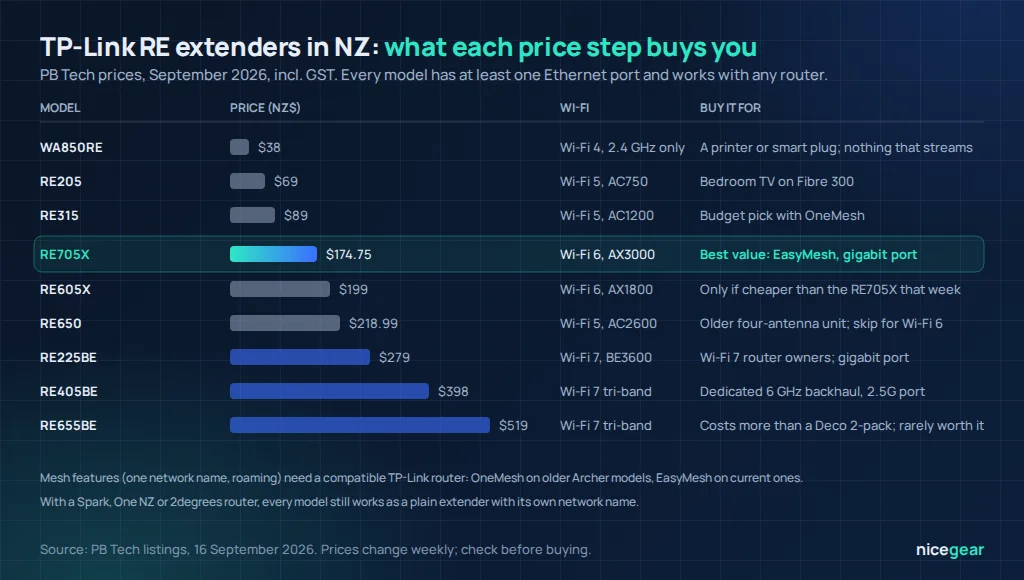
Every RE model plugs straight into a power point, has at least one Ethernet port so it can also feed a TV or console by cable, and pairs with any brand of router as a standard extender. The letters tell you the generation: plain numbers (RE205, RE315, RE450, RE650) are Wi-Fi 5, an X suffix (RE500X, RE605X, RE705X) means Wi-Fi 6, and BE (RE225BE, RE405BE, RE655BE) means Wi-Fi 7. Prices below are from PB Tech in September 2026.
| Model | Wi-Fi | Rated speed | Port | Mesh | NZ$ (Sept 2026) |
|---|---|---|---|---|---|
| WA850RE / WA855RE | Wi-Fi 4 | N300, 2.4 GHz only | 100 Mbps | No | $38–$49 |
| RE205 | Wi-Fi 5 | AC750 | 100 Mbps | OneMesh | $69 |
| RE315 | Wi-Fi 5 | AC1200 | 100 Mbps | OneMesh | $89 |
| RE450 | Wi-Fi 5 | AC1750 | Gigabit | OneMesh | $119 |
| RE705X | Wi-Fi 6 | AX3000 | Gigabit | OneMesh + EasyMesh | $174.75 |
| RE605X | Wi-Fi 6 | AX1800 | Gigabit | OneMesh + EasyMesh | $199 |
| RE650 | Wi-Fi 5 | AC2600 | Gigabit | OneMesh | $218.99 |
| RE225BE | Wi-Fi 7 | BE3600 dual-band | Gigabit | EasyMesh | $279 |
| RE405BE | Wi-Fi 7 | BE6500 tri-band | 2.5 Gbps | EasyMesh | $398 |
| RE655BE | Wi-Fi 7 | BE9300 tri-band | 2.5 Gbps | EasyMesh | $519 |
Two things stand out. The RE605X is listed above the better RE705X, which happens with older stock; buy whichever of the two is cheaper that week. And the top two Wi-Fi 7 units cost as much as a two-pack Deco mesh system, which does the whole-house job better; they only make sense as a single node behind a Wi-Fi 7 Archer router.
OneMesh vs EasyMesh: Which Routers Work
Plugged into any router, an RE extender creates its own network (usually your name with “_EXT” on the end) and your phone has to decide when to switch between the two, which it does badly. Mesh mode fixes that: the extender joins the router’s network under the same name, hands devices over as you move, and appears in the Tether app alongside the router. TP-Link has used two systems:
- OneMesh is TP-Link’s original scheme. It works between OneMesh-marked Archer routers and RE extenders and a few powerline units, and only with TP-Link gear.
- EasyMesh is the Wi-Fi Alliance’s open standard. TP-Link’s current Archer routers and the X and BE extenders support it, and in principle an EasyMesh extender can join an EasyMesh router from another brand, though results vary and a firmware update is often needed.
- Deco and Omada are separate systems. A Deco node cannot use an RE extender as a mesh node; buy another Deco instead.
- ISP routers from Spark, One NZ, 2degrees and the rest do not support either. The extender works, but as a plain repeater with its own network name.
Check the compatibility list on TP-Link’s NZ site before buying for mesh; the router page lists which extenders it accepts. If your router is an ISP model and you want real roaming, a two-node mesh system is the honest answer.
Find Your RE Model
Tell the tool what router you have and what the far room does, and it picks the RE model that fits, with the price to expect.
TP-Link extender picker
Matches your router, connection and the room’s needs to a specific RE model, and says when a Deco is the better buy.
Prices from PB Tech, September 2026, incl. GST. Mesh compatibility depends on the exact router model and firmware; check TP-Link’s list.
TP-Link Extender Setup, Step by Step
- Plug it in next to the router and wait for the power light to settle. Setting up at a distance is the most common failure.
- Use the Tether app (or press WPS on the router, then on the extender within two minutes). The app finds the extender, asks for your Wi-Fi password and offers mesh mode if your router supports it.
- Name the network. In mesh mode keep the router’s name. Otherwise give the extended network a clearly different name so you can see which one your phone is on.
- Update the firmware from the app before moving it; mesh support and stability fixes often arrive as updates.
- Move it to the halfway point between the router and the dead zone and check the signal LED: blue or green is right, red or orange means closer to the router.
- Test from the dead zone with our NZ speed test. Expect about half of what the extender receives; if it is under a third of your plan speed, move it one socket closer.
Getting the Most From an RE Extender
- Use the Ethernet port. A TV or console cabled to the extender gets the whole extended link and steadier latency than Wi-Fi.
- High-speed mode (in the app on dual-band models) uses one band for the link to the router and the other for your devices, which avoids the halving. Try it if the extender sits one wall from the router.
- Access point mode turns any RE unit into a wired access point if there is a network point in the room; it then delivers full speed with no wireless hop.
- Adaptive path selection on the X and BE models picks the faster band for backhaul automatically; leave it on.
- Do not chain two extenders. Speed drops to a quarter or worse; a second weak area means mesh.
Fix the router’s channels first
An extender repeats whatever it receives, including interference. Setting the router’s 2.4 GHz band to channel 1, 6 or 11 at 20 MHz and the 5 GHz band to 80 MHz, as in our router settings guide, often improves the extended network more than moving the extender.
RE Extender vs Deco Mesh
| RE extender (RE705X) | Deco mesh (X50 Pro 2-pack) | |
|---|---|---|
| Price (Sept 2026) | NZ$174.75 | NZ$407 |
| Coverage | One room or corner | Whole single-storey home, or two floors |
| One network name and roaming | Only with a compatible Archer router | Always |
| Works with an ISP router | Yes, as a separate network | Yes, in access point mode, or replaces it |
| Backhaul options | Wireless, or wired in AP mode | Wireless, Ethernet, or powerline on PX models |
| Best for | Renters, one dead room, a wired TV | Anyone with more than one weak area |
If you are buying an Archer router at the same time, an Archer plus an RE705X is a good single-room fix. If you are buying everything from scratch for a whole house, the Deco pair costs about the same as a router plus two extenders and works far better, and our modem router guide explains how it plugs into NZ fibre.
Our Verdict on TP-Link Wi-Fi Extenders
Our take
- Buy the RE705X for almost every single-room job; the RE315 if the room only streams and the budget is tight.
- Mesh mode is the real reason to stay in the TP-Link family. With an ISP router you get a plain repeater, which is fine if you name it clearly.
- Wi-Fi 7 RE units are for Wi-Fi 7 Archer owners; the RE405BE’s dedicated backhaul is the one worth its price.
- More than one weak area, or a Deco at home already: buy Deco, not RE.
Prices are NZ$ incl. GST as listed by PB Tech on 16 September 2026 and change weekly. Mesh compatibility depends on router model and firmware; check TP-Link’s current lists. Nicegear is independent and has no paid placements.
Sources and further reading
FAQs
Which TP-Link extender is best?
For most NZ homes the RE705X: Wi-Fi 6, AX3000, a gigabit port and support for both OneMesh and EasyMesh, at NZ$174.75 in September 2026. The RE315 is the budget choice and the RE405BE the pick for Wi-Fi 7 Archer routers.
Does a TP-Link extender work with a Spark or One NZ router?
Yes, as a standard extender with its own network name. The mesh features that give one network name and roaming only work with a compatible TP-Link Archer router.
What is the difference between OneMesh and EasyMesh?
OneMesh is TP-Link’s own system that links its routers and extenders; EasyMesh is the Wi-Fi Alliance standard that current TP-Link products use and that can, in principle, work across brands. Both give one network name with roaming. Deco uses neither.
Can I use a TP-Link extender with a Deco mesh?
Only as a separate repeater network, which defeats the point of mesh. Add another Deco unit instead; any Deco model can join an existing Deco system as a node.
Why is my TP-Link extender slow?
Usually because it is plugged in inside the dead zone rather than halfway to it, so it receives a weak signal and repeats a weak signal. Move it to where the signal LED shows blue or green, update the firmware, and try high-speed mode if it is close to the router.
Is a Wi-Fi 7 TP-Link extender worth it?
Only with a Wi-Fi 7 Archer router, and mainly the tri-band RE405BE, whose dedicated 6 GHz backhaul avoids the speed halving. The RE655BE costs more than a two-pack Deco system that would cover the house better.


