
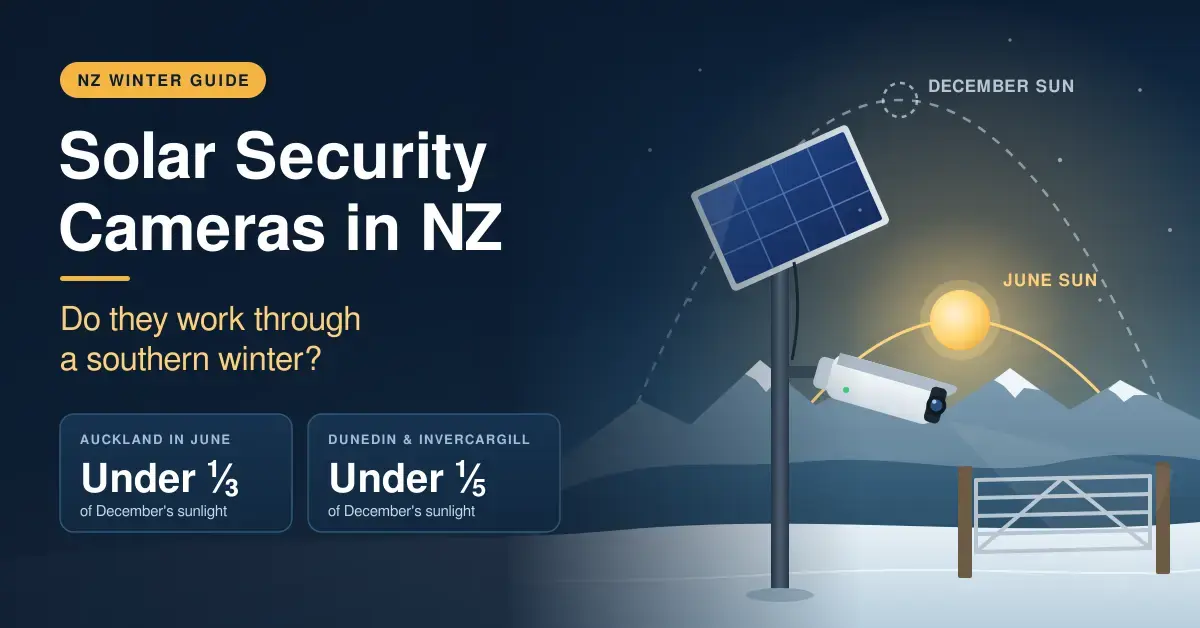
Solar security cameras do work through a New Zealand winter — but only when the panel catches direct sun and the camera isn’t being set off all day long. In June, Auckland receives under a third of the sunlight it gets in December, and Dunedin and Invercargill drop below a fifth. That makes where you mount the panel far more important than which brand ends up on the wall.
This guide is written for lifestyle-block owners, bach owners, renters and anyone keeping an eye on a gate, shed or driveway that sits well away from a power point. It draws on NIWA’s long-term solar-radiation records to show how much energy a small camera panel can realistically gather in each main centre, walks through the solar cameras actually sold in New Zealand, and explains what to do when there is no Wi-Fi at the spot you want to watch. For the wider decision between wired, battery and cloud systems, start with our home security camera guide.
Key Takeaways
- On an average June day a flat surface collects about 1.0 to 1.8 kWh of solar energy per square metre across NZ’s main centres, against 5.5 to 6.3 kWh in December (NIWA).
- A 2.5 W panel facing north covers a typical battery camera’s winter use several times over, even in Christchurch; shade or a south-facing wall can leave it short.
- Busy spots drain batteries fast: 100 clips a day uses close to four times the energy of 20.
- Solar cameras still need Wi-Fi at the mounting spot unless you choose a 4G model, and lithium batteries generally will not charge below 0 °C.
- NZ options include Tapo’s C610 and C660 kits (from about $229) and eufy’s SoloCam S220 and S340 ($299.95 and $499.95 RRP).
How much winter sun do solar cameras get in NZ?
New Zealand’s winter sunlight falls away sharply, and the numbers are stark. The table below shows NIWA’s mean daily global solar radiation on a flat, horizontal surface, converted to kilowatt-hours per square metre — a figure that doubles as “peak sun hours”, the shorthand the solar industry uses for a full day’s usable light.
| City | June (kWh/m² a day) | December (kWh/m² a day) | Annual sunshine hours (1971–2000) |
|---|---|---|---|
| Auckland | 1.8 | 6.3 | 2,060 |
| Wellington | 1.4 | 6.3 | 2,065 |
| Christchurch | 1.3 | 6.2 | 2,100 |
| Dunedin | 1.0 | 5.5 | 1,585 |
| Invercargill | 1.0 | 5.9 | 1,614 |
These figures come from NIWA’s The Climate and Weather of New Zealand (Table 17, mean daily global solar radiation) and its summary climate tables for selected locations; the annual sunshine totals are drawn from NIWA’s mean monthly sunshine hours series. The headline point: a June day delivers roughly one-fifth to one-third of the solar energy of a December day, and the further south you go, the deeper that winter dip.
The low sun angle is the other half of the problem. At midwinter the noon sun sits only about 30 degrees above the horizon in Auckland and around 20 degrees in Dunedin and Invercargill, so trees, fences, neighbouring houses and your own roofline throw shadows far longer than they do in summer. A spot that bakes in sun in March can sit in shade all day in June. Any judgement about “will it get enough sun” has to be made in winter, not on the sunny afternoon you happen to be installing the camera.
Will a solar camera keep up in winter?
A solar-powered security camera sips power while it waits and spends almost all of its energy on recording clips and live viewing. That means the real question is not so much your latitude as how often the camera wakes up and how much genuine sun the panel sees. A quiet camera on a well-placed panel is comfortable even in Southland; a busy camera on a shaded wall struggles anywhere.
To make that concrete, the table below works through three June scenarios. Each assumes a 2.5 W panel and allows for roughly 50% real-world efficiency once you account for panel angle, cable and charging losses and cold; recording and live view are treated as about 2 W, and standby as negligible. Treat the numbers as a guide, not a guarantee — weather and site vary.
| Scenario | Panel & placement | Camera activity | Collected on a June day | Used per day | Result |
|---|---|---|---|---|---|
| Christchurch driveway | North-facing, clear of shade | 20 clips of 20 s + 2 min live | ~1.6 Wh | ~0.3 Wh | Comfortable (about 5× the need) |
| Dunedin side gate | East/west or lightly shaded | 40 clips of 20 s | ~0.8 Wh | ~0.5 Wh | Marginal — a grey week will bite |
| Invercargill roadside | South eave, heavily shaded | 100 clips of 20 s | ~0.3 Wh | ~1.2 Wh | Runs flat in roughly six weeks |
The gap between the first and last rows is the whole story. Both use the same camera and the same panel; the only differences are placement and how often the camera fires. Face the panel at the low northern sun and keep the trigger count sensible and it collects several times what the camera needs, with margin for a run of dull days. Bury it under a south-facing eave pointed at a busy road and it collects a fraction of what the camera burns, so even a full 10,000 mAh battery drains within weeks. Frost makes the southern case worse still, because most lithium batteries will not accept charge below 0 °C — so a crisp, clear Central Otago morning can arrive with the sun shining and the battery refusing to take it until things warm up.
Getting the Most From a Solar Camera Panel
- Face the panel north and tilt it steeply for winter — roughly your latitude plus 10 to 15 degrees, or about 50 to 60 degrees in most of NZ.
- Keep it clear of shade between about 10 am and 2 pm in June, when most of the winter energy arrives.
- Use the panel’s extension cable so the camera can watch the right spot while the panel sits in full sun.
- Cut false triggers with activity zones and lower sensitivity, and shorten the clip length.
- Wipe the panel every few months; dust, bird droppings and salt film all cut output.
How a solar security camera actually charges
A camera solar panel does not power the camera directly; it trickle-charges the internal battery, and the battery runs the camera. That buffer is what makes solar viable in a climate as changeable as New Zealand’s. On a bright day the panel banks more than the camera uses and the battery fills; on a grey day the camera draws down the reserve it built up earlier. As long as the good days outweigh the bad across a fortnight or so, the battery never empties.
This is also why a slightly larger or better-aimed panel earns its keep in winter even though it cannot beat the camera’s charging ceiling. On a dim June afternoon a small flat panel may only trickle a few tenths of a watt; a panel tilted to face the low sun squarely can still reach its 2.5 W limit for the couple of usable hours around noon. The difference over a week of short days is the difference between a battery that slowly recovers and one that slowly dies. The battery capacity itself — usually 9,000 to 10,000 mAh, around 37 Wh — sets how long the camera can coast through a genuinely sunless stretch: at light use that is well over a month, but at a busy 100-clips-a-day it can be just a few weeks.
Solar security cameras worth considering in NZ
The right solar camera for an NZ property comes down to your budget, whether you want a hub that keeps footage inside the house, and how much detail you need. All of the models below are sold locally and ship with, or accept, a matching solar panel.
One thing to check on any of them is the lens. These cameras use wide-angle optics — typically 105 to 135 degrees — rather than an extreme, heavily-distorting fisheye lens, so faces and number plates stay usable across the frame rather than bending away at the edges. A pan/tilt model covers a wider area from one spot, while a fixed camera trades that for a simpler, cheaper build.
| Model | Panel | Resolution | Notes | NZ price (approx.) |
|---|---|---|---|---|
| Tapo C610 KIT | Included | 2K 3MP | Pan/tilt | From about $229 |
| Tapo C660 KIT | Tapo A201, up to 2.5 W | 4K 8MP | Pan/tilt, 10,000 mAh battery, dual-band Wi-Fi, IP65 | From about $240 |
| Tapo C615F KIT | Included | 2K | Pan/tilt with floodlight | From about $289 |
| Tapo C425 | Optional A202 panel | 2K 4MP | 10,000 mAh battery, IP66 | From about $172 + panel |
| eufy SoloCam S220 | Built in | 2K | No hub needed | $299.95 RRP |
| eufy SoloCam S340 | Removable 2.2 W panel | 3K wide + 2K telephoto | Pan/tilt, 8 GB built-in storage | $499.95 RRP |
| eufyCam 3 (S330), two-pack | Built in | 4K | Records to a HomeBase 3 | $1,329.95 RRP |
Tapo solar cameras
For the budget end, the Tapo solar kits are the obvious starting point. The Tapo C660 KIT pairs a 4K 8MP sensor with dual-band Wi-Fi, a 10,000 mAh battery and its A201 panel, which charges at up to 2.5 W — good value at about $240. If you would rather a fixed view than pan/tilt, the Tapo C425 battery camera takes the optional A202 panel and rates its 10,000 mAh battery at up to 300 days from a single charge under light use. Tapo cameras can record to a microSD card locally and offer an optional cloud plan, so there is no forced subscription.
eufy solar cameras
eufy’s solar cameras cost more but need no subscription and can feed a HomeBase that keeps footage inside the house. The SoloCam S340 is the standout for coverage: a 3K wide lens plus a 2K telephoto, pan/tilt to a full 360 degrees, 8 GB of built-in storage and a removable 2.2 W panel. eufy says its eufyCam 3 needs roughly two hours of direct sun a day to stay topped up, which is a handy benchmark for testing a mounting spot in June. eufy also sells a separate Smart Solar Panel (about $129) for compatible cameras if the bundled one falls short.
Arlo and solar
Arlo sells a solar panel charger for cameras such as the Pro 6th Gen, but be clear-eyed about the catch: Arlo’s cameras need an Arlo Secure plan to save recordings to the cloud, so the running cost is higher than a Tapo or eufy setup that stores footage locally for free. The hardware is polished, but factor the subscription into any comparison.
Solar cameras with no Wi-Fi: 4G options
A solar camera removes the power cable, not the need for a network. Most still connect over 2.4 GHz Wi-Fi, which rarely reaches a gate 200 metres down a lifestyle-block driveway. There are two ways around it.
- Bring Wi-Fi to the camera. An outdoor Wi-Fi extender or a point-to-point wireless link can carry your home network out to a shed or gate, after which any Wi-Fi solar camera will work. This is usually the cheaper option if the distance is within a few hundred metres and there is line of sight.
- Use a 4G camera. Models with a SIM slot send clips over the mobile network instead, such as Arlo’s Go 2 (RRP about $489) or eufy’s 4G LTE Cam S330 (about $600 from eufy, more at some retailers). Check your carrier’s coverage at the exact spot before buying, budget for a data plan, and lean on activity zones so a windblown hedge doesn’t chew through your data allowance.
Placement rules for 4G and Wi-Fi cameras are the same as for any other outdoor camera; our outdoor security camera guide covers mounting height, angle and weatherproofing.
Choosing a solar panel for a security camera
Camera panels are deliberately small — usually 2 to 3 W — and the camera’s own charging circuit sets a ceiling on how fast it can top up. The C660 KIT’s A201 panel, for instance, charges at up to 2.5 W, and a bigger panel cannot push past that limit. What a larger or better-angled panel does buy you is reaching that ceiling more often on dull winter days, which is exactly when it matters. Stick to the maker’s own panel or one it lists as compatible so the plug, voltage and charging limits all match.
If you need more than a single camera at a remote spot — say a PoE camera plus a 4G router at a far gate — you have crossed into proper off-grid territory: a 12 V system with a larger panel, a charge controller and a deep-cycle battery. Sizing that correctly for New Zealand’s winter light is a different exercise, and our solar panel and battery calculator is built for exactly that job.
Privacy and the law when you point a camera outside
A camera watching your own property is fine, but the moment it captures a neighbour’s yard, a shared driveway or the footpath, New Zealand’s Privacy Act 2020 comes into play, because you are collecting personal information about identifiable people. The Office of the Privacy Commissioner’s guidance is practical: only film what you genuinely need for security, angle the camera to minimise what it captures beyond your boundary, and tell people if you can — a visible sign at the gate usually does the job. Audio is treated more strictly than video, so if your camera records sound, be especially careful about capturing conversations you are not part of.
Solar cameras raise one extra wrinkle: because they are easy to mount anywhere, it is tempting to put them somewhere that stares straight into a neighbour’s window. Resist it. If a dispute ever reaches the Privacy Commissioner, “I only pointed it at my own gate” is a far stronger position than a wide pan/tilt sweeping the whole street. Keeping footage on local storage rather than a third-party cloud, and deleting old clips, also limits how much personal data you are holding on other people.
Common mistakes with solar cameras
- Mounting the panel where the camera goes. The best view is often a shaded south wall. Run the panel’s extension cable to a sunny spot instead of chaining the two together.
- Checking the sun in summer. Stand at the spot at midday in June, or picture a sun only 20 to 30 degrees above the northern horizon, before you commit.
- Leaving sensitivity on maximum. A camera facing trees or a road can trigger hundreds of times a day, and every trigger costs battery.
- Expecting 24/7 recording. Most solar battery cameras record short motion clips to conserve power; continuous recording is a different, far hungrier mode.
- Forgetting the frost. Lithium batteries generally will not accept charge below 0 °C, so in Central Otago or Southland a frosty morning’s sun can simply go to waste.
Which solar camera should you buy?
Yes, solar cameras work in New Zealand winters — Southland included — provided the panel faces north with a clear view of the low midday sun and the camera is not being tripped constantly by traffic or foliage. For the best value, the Tapo C660 KIT delivers 4K pan/tilt coverage for around $240, with the cheaper C610 KIT a fine choice if 2K is enough. If you want no subscription and footage kept in the house, look at the eufy SoloCam S340, or a eufyCam 3 kit if you want a HomeBase hub. And if there is no Wi-Fi where you need to watch, extend your network first where you can, and only fall back to a 4G camera — with a data plan budgeted — when extending isn’t practical.
Disclaimer: Prices were checked in September 2026 and change often; “from” prices are the lowest NZ retail listings found at the time and RRPs are from the brand stores. The worked examples use long-term NIWA averages and rough efficiency assumptions, so real results vary with weather and site. Nicegear is independent, sells nothing, and has no commercial relationship with any brand named here.
Sources
- The Climate and Weather of New Zealand, Table 17: mean daily global solar radiation – NIWA
- Summary climate information for selected NZ locations, including annual sunshine hours – NIWA
- Mean monthly sunshine hours datasets – NIWA
- Tapo C660 KIT specifications – TP-Link Tapo
- Tapo C425 specifications and battery claim – TP-Link Tapo
- SoloCam S340 specifications – eufy New Zealand
- Arlo cameras, including the Go 2 – Arlo New Zealand
Frequently Asked Questions (FAQ)
Do solar security cameras work in winter in NZ?
Yes, provided the panel gets direct midday sun. June brings only about a fifth to a third of December’s solar energy, so a north-facing, unshaded panel keeps a typical camera topped up comfortably, while a shaded panel or a camera triggered all day can run flat.
Do solar cameras work without Wi-Fi?
Most do not, because they still send video over your Wi-Fi even though they draw power from the sun. For a site with no Wi-Fi, either extend your home network to the spot with an outdoor access point, or use a 4G camera with its own SIM, such as the Arlo Go 2 or eufy 4G LTE Cam S330.
What size solar panel do I need for a security camera?
The maker’s own 2 to 3 W panel is enough for most battery cameras as long as it faces north without shade. A larger panel helps most on dull winter days, but it cannot charge faster than the camera’s own charging limit, so match the panel to the camera rather than simply buying the biggest one.
Can solar security cameras record 24/7?
Most solar battery cameras record short motion clips to save power rather than filming continuously. Some kits advertise 24/7 recording, but it uses far more energy, so check the specifications and expect it to struggle through a southern winter on solar alone.
Where should I mount a solar panel for a camera in NZ?
Face it north, tilt it steeply for winter — roughly your latitude plus 10 to 15 degrees, or about 50 to 60 degrees across most of New Zealand — and keep it clear of shade from mid-morning to mid-afternoon in June. Use the panel’s extension cable rather than mounting it in the camera’s own shadow.




