
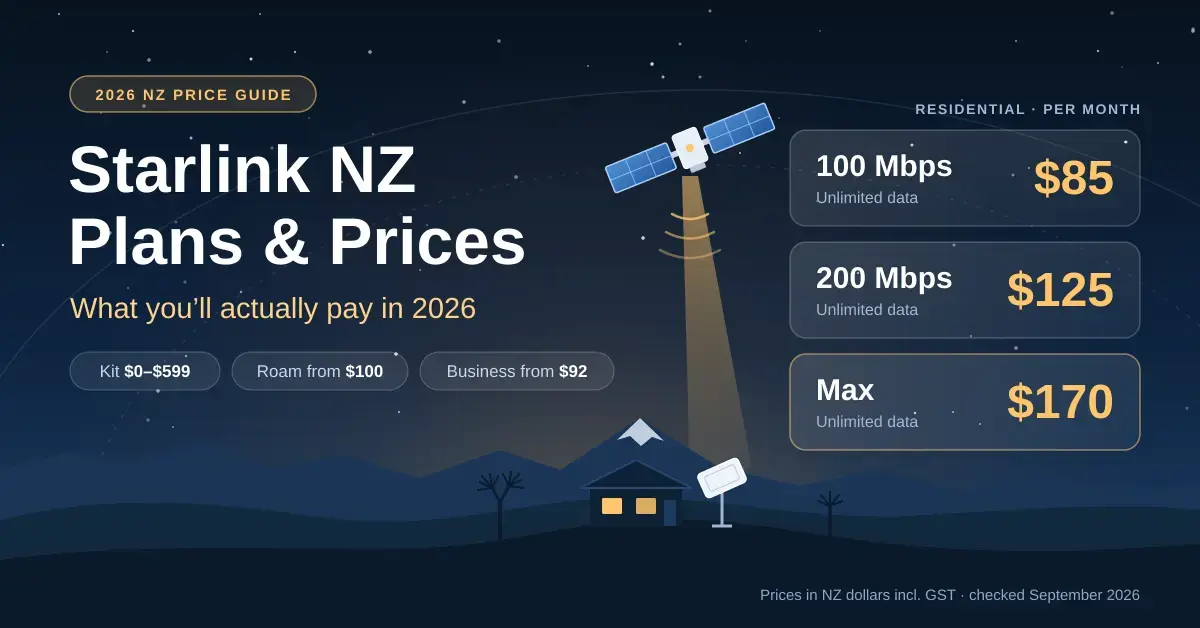
Starlink’s New Zealand residential plans cost $85 a month for the 100 Mbps tier, $125 for 200 Mbps and $170 for Residential Max, with Roam plans from $100 and business plans from $92 (list prices checked on starlink.com/nz and NZ retailer sites in September 2026, in NZ dollars including GST). Hardware ranges from nothing upfront in a handful of “select areas” to about $599 for a Standard Kit bought at retail. This guide breaks down every cost a rural household, bach owner, traveller or small business actually meets: the monthly fee, the dish, installation, power and the extras nobody warns you about.
If you are still deciding whether satellite suits your place at all, start with our Starlink NZ overview and come back to cost it here. If you already know you want it, read on for the real numbers.
Key points
- All three residential plans include unlimited data; you pay for a speed cap and network priority, not a data allowance.
- Commerce Commission testing (April 2026) averaged 245 Mbps on Residential Max and 130 Mbps on Residential 100 Mbps, at 25–26 ms latency.
- Hardware runs from $0 upfront in select areas to about $599 for a Standard Kit at retail; the Starlink Mini is $349–$449.
- Budget for a mount or installer ($140–$290) and for power — the Standard dish averages 75–100 W, roughly $230–$310 a year at 35c/kWh.
- Most one-to-three-person households are fine on Residential 100 Mbps; busy homes, gamers and remote workers get the most from Max.
Starlink NZ plans and prices at a glance
Starlink sells its plans directly to New Zealanders, while retailers such as JB Hi-Fi and Noel Leeming handle only the hardware. Starlink restructured its residential line-up in 2026, replacing the old Residential and Residential Lite plans with three speed tiers, and it adjusted prices again mid-year. You can see the current tiers on Starlink’s Residential plans page, its Roam page and its Business page. This is what the NZ site listed when we checked in September 2026.
| Plan | Monthly price | Download speed | Data | Best for |
|---|---|---|---|---|
| Residential 100 Mbps | $85 | Capped at 100 Mbps | Unlimited | 1–3 people: browsing, streaming, calls |
| Residential 200 Mbps | $125 | Capped at 200 Mbps | Unlimited | Small to medium households |
| Residential Max | $170 | 400+ Mbps typical | Unlimited, top priority | Big households, gaming, working from home |
| Roam 100GB | $100 | Varies with location | 100 GB, then unlimited low-speed | Occasional trips, the bach |
| Roam Unlimited | $235 | Varies with location | Unlimited | Full-time travellers, campervans |
| Business (Local Priority) | from $92 | Priority speeds | 50 GB priority data and up | Farms, shops, offices |
The 100 Mbps and 200 Mbps tiers are marked “available in select areas”, so what appears at checkout depends on your address and how busy your local cell is. If a plan does not show when you enter your address, it is not on offer there. Starlink itself is the low-Earth-orbit satellite network operated by SpaceX; you can read the background on Starlink’s Wikipedia page.
Quick facts
| Provider | Starlink (SpaceX) |
|---|---|
| Official site | starlink.com/nz |
| Cheapest residential plan | Residential 100 Mbps — $85/month |
| Top residential plan | Residential Max — $170/month |
| Data | Unlimited on all residential plans |
| Hardware | $0 upfront (select areas) to ~$599 (Standard Kit); Mini $349–$449 |
| Typical speeds (Comm Comm, Apr 2026) | 130 Mbps (100 Mbps plan) to 245 Mbps (Max) |
| Latency | 25–26 ms |
| Standby / pause fee | Around $20/month |
| Availability | Nationwide, subject to local cell capacity |
What changed in Starlink’s NZ pricing in 2026
Two things moved this year. First, Starlink swapped its two-plan residential structure for the 100 Mbps, 200 Mbps and Max tiers — a change the Commerce Commission’s independent broadband testing picked up in early 2026. Second, prices rose mid-year: NZ reports put the main residential plan’s increase at about 7 percent, from $159 to $170 a month, and the Standby (pause) fee went up at the same time. If you signed up before the change, check which tier your account now shows, because the cheapest option for your household may no longer be the one you started on.
How much does Starlink cost upfront in NZ?
The monthly fee is only half the picture. The first bill can also include hardware, a mount and installation, and those add up quickly.
Starlink hardware prices in NZ
The current Standard Kit (Starlink calls it the Standard V4) ships with the dish, a kickstand, the Wi-Fi router, a 15 m cable and the power supply. What you pay depends on where you buy and where you live:
- $0 upfront: Starlink advertises “no upfront hardware cost in select areas”. The offer appears — or doesn’t — when you enter your address on starlink.com. Read the checkout terms first, because free-hardware deals usually carry conditions such as a minimum term.
- About $449: the hardware price Starlink quotes on its NZ business page, and the price NZ retailers ran on the Standard Kit earlier in 2026.
- About $599: the Standard Kit price at JB Hi-Fi and Noel Leeming in September 2026. Buying from a local retailer means a local store handles any Consumer Guarantees Act claim.
- Starlink Mini, $349–$449: JB Hi-Fi listed the Mini at $349 and Noel Leeming at $449. It is the portable, all-in-one option, and our Starlink Mini NZ guide covers when it beats the Standard dish.
You can check the dish’s exact dimensions and power draw on Starlink’s Standard kit specification sheet. Buying second-hand? Make sure the seller has removed the kit from their Starlink account first, or you will not be able to activate it.
Installation and mounting costs
The kickstand is fine for testing on the lawn, but a permanent install usually needs a proper mount, and plenty of rural houses need a longer cable too. Typical NZ retail prices in September 2026:
| Item | Typical price | Notes |
|---|---|---|
| Kickstand (in the box) | $0 | Fine on a clear lawn or deck; not wind-proof |
| Third-party wall, pivot or pipe mount | $140–$190 | Common at Noel Leeming and PB Tech |
| Replacement Starlink cable, 45 m | $260 | For dishes well away from the house |
| Masonry routing kit | about $98 | Tidy cable entry through brick or block |
| Retailer setup and delivery | $189 | Noel Leeming Tech Solutions standard setup |
| Retailer wall-mount installation | $289 | Setup including wall mounting |
| Residential Max install | Included | Starlink lists Home Pro Install with Max in NZ |
Our Starlink accessories guide explains which cables, routers and adapters you actually need, so you don’t pay twice for parts your kit already includes.
Which Starlink plan should you choose?
Every residential plan has unlimited data, so the real question is how much speed you need at the busiest time of the evening. Starlink’s own Help Centre article on the residential plans sets out the caps; here is what each tier delivers in practice.
Residential 100 Mbps ($85 a month)
Downloads are capped at 100 Mbps with uploads of up to 15–35 Mbps, and Starlink pitches it at one-to-three-person households. In the Commerce Commission’s April 2026 testing, volunteers on this plan averaged 130 Mbps down and 47 Mbps up across all hours (115 Mbps at peak), at 25 ms latency. That comfortably covers a couple streaming in 4K, video calling and browsing at once. The Commission did note a clear step down from the old Residential Lite plan, so don’t expect Max-like evenings.
Residential 200 Mbps ($125 a month)
Double the speed cap, the same upload range and the same router. It suits a family of four where two people might be streaming while someone else is on a video call or downloading a game. It was not part of the Commission’s April 2026 round, so there is no independent NZ average for it yet.
Residential Max ($170 a month)
Max gets the highest network priority, which matters most at 8pm when your local cell is busiest. Starlink quotes typical downloads of 400+ Mbps and uploads of 20–40 Mbps; the Commission’s testing averaged 245 Mbps down (224 Mbps at peak), 51 Mbps up and 26 ms latency. In New Zealand, Max also includes Home Pro Install and eligibility for an optional Starlink Mini on discounted Roam pricing, which takes some sting out of the price.
Once you are connected, run our NZ broadband speed test at a few different times of day to see whether you are on the right tier. If speeds are fine beside the router but poor in the lounge, the fix is usually Wi-Fi coverage rather than a pricier plan — our Starlink Wi-Fi extender guide covers the mesh options.
What Starlink really costs over a year and three years
Once you add hardware and a mount, the sticker price and the true cost diverge. The table below spreads a typical setup over the first year and over three years, so you can compare plans on the same basis.
| Plan | Monthly | First-year total | Average per month over 3 years |
|---|---|---|---|
| Residential 100 Mbps | $85 | ~$1,784 | ~$106 |
| Residential 200 Mbps | $125 | ~$2,264 | ~$146 |
| Residential Max | $170 | ~$2,639 | ~$187 |
| Roam 100GB (with Mini) | $100 | ~$1,549 | ~$110 |
| Roam Unlimited (with Mini) | $235 | ~$3,169 | ~$245 |
| Business, 50 GB priority | $92 | ~$1,553 | ~$105 |
Those first-year totals assume 12 active months and a one-off hardware and setup spend: a $599 Standard Kit plus a $165 mount for residential plans, a $349 Starlink Mini for Roam, $449 hardware for business, and included Home Pro Install on Residential Max. Power is extra — roughly $230–$310 a year for the Standard dish. Adjust the numbers for your own setup, and knock the hardware line down to zero if a $0-upfront offer appears for your address.
What 12 months of each plan costs before hardware
Before any hardware, a year of Residential 100 Mbps costs $1,020 and a year of Residential Max $2,040. Roam Unlimited is the priciest way to stay online at $2,820 a year, which is why most people only run it while they are actually travelling.
Worked example: a bach used half the year
Say you want Starlink at a Coromandel bach you use from October to March. On Residential 100 Mbps, six active months cost 6 × $85 = $510. Pause over winter with Standby rather than cancelling and add roughly 6 × $20 = $120, for about $630 a year in service. Add a $599 Standard Kit and a $165 mount and the first year comes to about $1,394; over three years that averages around $74 a month. Starlink explains the rules in its guide to pausing service — Standby keeps a slow connection alive for emergency messaging and lets you reactivate without re-ordering, and it is available on Residential, Roam and Priority plans (some promotional and rental kits excepted).
The running cost nobody quotes: power
Starlink’s spec sheet puts the Standard dish’s average draw at 75–100 W. Left on around the clock, that is about 657–876 kWh a year, or roughly $230–$310 at an average residential rate near 35c/kWh. The Mini averages 25–40 W, which works out at about $77–$123 a year. A timer can trim this if nobody needs the internet overnight, but the dish takes a few minutes to boot and reconnect each time the power returns.
Starlink Roam NZ price: travel, boats and the bach
Roam plans let you use Starlink anywhere it has coverage, not just at your registered address. Roam 100GB costs $100 a month for 100 GB of full-speed data, then unlimited low-speed data for the rest of the month; Roam Unlimited costs $235 a month and is aimed at people living on the road. Roam covers territorial and inland waters, with open-ocean coverage as a paid option, and you can pause it with Standby between trips. Pair it with the Mini and you have a kit that runs from a 12 V system in a campervan or boat, which is why the Mini is usually the better fit for Roam: it is cheaper, lighter and drinks far less power than the Standard dish.
Starlink business plan NZ pricing
Business plans start at $92 a month with hardware around $449, according to Starlink’s NZ business page. They are built around priority data rather than speed tiers: you pick a preset allowance and add blocks of 50 GB or 500 GB as needed. Priority traffic gets precedence on the network, so EFTPOS, cloud accounting and video calls hold up better when the local cell is busy. NZ resellers list larger allowances at several hundred dollars a month (500 GB at roughly $260), so get a quote before running a farm office or shop on it.
Is there a Starlink rural offer in NZ?
There is no government subsidy or rural-only plan. The closest thing is Starlink’s own “no upfront hardware cost in select areas” deal, which appears for some addresses depending on local capacity; Starlink does not publish a list of qualifying areas, so the only way to check is to enter your address at starlink.com/nz. Starlink is now the biggest name in rural broadband: the Commerce Commission reported on 30 June 2026 that it holds 27 percent of rural connections, more than any other provider (see Rural connectivity: a market reset in motion). It is not the only option, though — of households moving off copper, the Commission found 54 percent chose Starlink and 46 percent stayed with local providers, so compare it with regional fixed-wireless operators first. Our Wireless Nation review is a good place to start.
Common mistakes to avoid before you buy
The usual mistakes cost more than the gap between plans:
- Paying for Max when 100 Mbps would do. Try a cheaper tier for a month and test it; you can change plans in your account, subject to availability.
- Ignoring obstructions. Trees and roof lines cause short dropouts. Run the obstruction check in the Starlink app before you drill any holes.
- Forgetting the extras. A mount plus a retailer’s install service adds roughly $330–$480 to the first bill, and a 45 m cable another $260.
- Assuming the router covers the whole house. The router is rated for up to about 297 m² in ideal conditions; brick, concrete and foil-backed insulation shrink that fast.
- Buying used without a transfer. Get the seller to remove the kit from their account before any money changes hands.
- Forgetting power cuts. Starlink goes down when the power does — our Starlink outage guide covers backup options.
Starlink vs fibre and fixed wireless on price
If fibre reaches your gate, it will almost always win. The Commission’s April 2026 averages had Fibre Max at about 877 Mbps with 5 ms latency, against 245 Mbps and 26 ms for Starlink Max — the full figures are in the Measuring Broadband New Zealand report 28. Where fibre is not an option, the Commission found Starlink’s peak-time downloads run around four times faster than 4G fixed wireless, the next best alternative. On value, Residential 100 Mbps at $85 for a tested 130 Mbps average works out at about 65c per Mbps a month; Max at $170 for 245 Mbps is about 69c.
For most rural households of one to three people, Residential 100 Mbps at $85 is the sensible starting point — it tested above its cap in April 2026, and you can step up later. Busy families, gamers and people working from home get the most from Residential Max, where the priority, included install and optional Mini offset some of the price. Baches and holiday homes are best served by paying for the months you use and pausing the rest with Standby, and travellers should start with Roam 100GB and a Mini, moving to Unlimited only if they genuinely live on the road.
Please note: Starlink changes plans, prices and offers often and with little notice. All prices here are in NZ dollars including GST and were checked on starlink.com/nz and NZ retailer sites in September 2026. Nicegear is independent, sells nothing and has no commercial relationship with Starlink or any retailer mentioned; always confirm the current price and availability for your address before you order.
Sources
- Starlink Residential plans – starlink.com/nz
- What are the Residential plans? – Starlink Help Centre
- How does pausing service work? – Starlink Help Centre
- Standard kit specification sheet – Starlink (PDF)
- Measuring Broadband New Zealand report 28, July 2026 – Commerce Commission (PDF)
- Rural connectivity: a market reset in motion – Commerce Commission
- Starlink Standard Kit V4 X price – Noel Leeming
- Starlink hardware pricing – JB Hi-Fi NZ
- Starlink plans and pricing NZ – Mobile Systems
Frequently asked questions
How much is Starlink in NZ per month?
Residential plans cost $85 (100 Mbps), $125 (200 Mbps) or $170 (Max) a month, Roam costs $100 or $235, and business plans start at $92. These are list prices on starlink.com/nz in September 2026, including GST.
Does Starlink NZ have a data cap?
No residential plan has a data cap — 100 Mbps, 200 Mbps and Max all include unlimited data. Roam 100GB gives you 100 GB at full speed and then unlimited low-speed data, while business plans are sold in blocks of priority data.
How much does Starlink hardware cost in NZ?
It ranges from $0 upfront in select areas to about $599 for the Standard Kit at retail, and Starlink quotes around $449 for business hardware. The Starlink Mini was $349–$449 at NZ retailers in September 2026.
Can I pause Starlink over winter?
Yes. Standby mode pauses full service for a small monthly fee (around $20 in NZ reports from mid-2026) and keeps low-speed data for emergency messaging. You switch it on and off from your account on starlink.com, which makes it well suited to baches and holiday homes.
Is Starlink worth it compared with fibre?
Not if you can get fibre, which is faster, has far lower latency and is usually better value per Mbps. Starlink earns its keep where the alternatives are copper, patchy 4G or slow fixed wireless.




