
For most homes, the best smart plugs NZ retailers sell are Wi-Fi plugs with Australian/NZ pins, a 10 A rating and energy monitoring, such as TP-Link’s Tapo P110 or the Matter-certified Tapo P110M (about $27–$35, checked September 2026). This guide is for renters and homeowners who want schedules, remote control and real power readings without touching the wiring.
A smart plug sits between the wall socket and an appliance and switches it on a timer, from your phone or by voice. If you’re still deciding which devices are worth buying at all, start with our beginner’s guide to smart home devices in NZ. Below: which plugs to buy, the NZ electrical rules, and a calculator that shows what scheduling actually saves.
Key takeaways
- Buy AU/NZ versions: Type I pins (AS/NZS 3112), a 10 A (2,300–2,400 W) rating and the RCM mark.
- The Tapo P110 and P110M are the best value; the P110M adds Matter, so it also works with Apple Home.
- Zigbee and Thread plugs suit anyone running a hub such as Home Assistant.
- Savings come from scheduling heaters, dehumidifiers and towel rails, not from cutting 2–5 W of standby.
- Hard-wired smart switches and in-wall relays are a job for a licensed electrician.
In this guide
- Best smart plugs NZ: our picks for 2026
- The role of smart plugs in modern Kiwi households
- Technical standards for New Zealand electrical safety
- Energy monitoring capabilities for cost savings
- Interoperability and the impact of Matter
- Optimizing network connectivity and range
- Scheduling and automation strategies
- Physical design and multi-plug solutions
- Security and privacy for smart hardware
- Smart plugs in rental properties
- What to check before you buy
- Future trends in smart power management
- Final thoughts
Best smart plugs NZ: our picks for 2026
Our shortlist from what NZ retailers stocked in September 2026, all AU/NZ versions. Prices are typical ranges across PB Tech, Noel Leeming, JB Hi-Fi and others.
| Plug | Connects via | Energy monitoring | Works with | Typical price | Best for |
|---|---|---|---|---|---|
| TP-Link Tapo P110M | 2.4 GHz Wi-Fi + Matter | Yes | Google, Alexa, Apple Home, SmartThings | About $34 | Most homes |
| TP-Link Tapo P110 | 2.4 GHz Wi-Fi | Yes | Google, Alexa | $27–$33 | Cheapest energy readings |
| TP-Link Tapo P100 | 2.4 GHz Wi-Fi | No | Google, Alexa | Less than the P110 | Lamps and timers |
| Brilliant Smart Wi-Fi range | 2.4 GHz Wi-Fi | Selected models | Google, Alexa | Varies | USB, double and outdoor plugs |
| Eve Energy (AU version) | Thread (Matter) | Yes | Apple Home, Google, Alexa, SmartThings | Premium; stock varies | Apple homes |
| Zigbee plugs (AU pins) | Zigbee | Most models | A Zigbee hub or Home Assistant | Varies | Home Assistant |
Tapo smart plug: P100 vs P110 vs P110M
Tapo is the default choice here: widely stocked, a simple app and no subscription. The P100 is a plain on/off plug with schedules and timers. The P110 adds energy monitoring, showing live watts plus daily and monthly kWh.
The P110M adds Matter certification. Its AU datasheet lists a 10 A / 2,300 W maximum, 220–240 V input, 2.4 GHz Wi-Fi and Bluetooth for setup only. Pick it if anyone wants Apple Home or Siri control, or you plan to add a Matter hub; otherwise the P110 is the better buy.
Brilliant smart plug options
Brilliant Lighting, an Australian brand stocked by NZ retailers including PB Tech, sells a Wi-Fi range run through the Brilliant Smart app. The NZ line-up includes plugs with USB-A and USB-C chargers, a double plug, a four-outlet power board, an IP44 outdoor double plug and a wall plug with energy monitoring. Only some models report power use, so check the listing.
Zigbee smart plug NZ options
Zigbee plugs don’t use your Wi-Fi. They talk to a Zigbee coordinator, such as the Zigbee radio on a Home Assistant Green setup or an Aqara hub, and every mains-powered Zigbee plug also acts as a router that extends the mesh for battery sensors. The catch is availability: many are sold with EU, UK or US pins, so only buy one listed with AU/NZ pins and an RCM mark.
HomeKit smart plug NZ options
The easy route into Apple Home is Matter: a Matter-certified plug such as the Tapo P110M joins the Home app when you scan its setup code. Eve Energy’s AU version uses Matter over Thread, so it needs a Thread border router such as a HomePod mini or a recent Apple TV 4K, which you’ll want anyway for control away from home.
The role of smart plugs in modern Kiwi households
Smart plugs earn their keep on appliances that plug in and have a simple on/off switch:
- Bedroom fan and panel heaters, set to warm the room before you get up (read the heater rules below).
- Dehumidifiers, timed for when the house is empty or power is cheaper.
- Plug-in heated towel rails, which are often left on all day.
- Lamps on a sunset schedule while you’re away, plus Christmas lights and chargers.
They’re the wrong tool for heat pumps (use the unit’s own Wi-Fi control instead), fridges, freezers and anything hard-wired.
Technical standards for New Zealand electrical safety
NZ runs on 230 V at 50 Hz with Type I sockets, the angled flat pins shared with Australia and set out in AS/NZS 3112. A standard socket is rated 10 A, about 2,300 W at 230 V (some plugs quote 2,400 W, rated at 240 V).
| Check | What you want | Why it matters |
|---|---|---|
| Pins | AU/NZ Type I (AS/NZS 3112) | Fits NZ sockets without an adaptor |
| Voltage | 220–240 V, 50 Hz | US plugs are built for 120 V |
| Rating | 10 A, 2,300–2,400 W | Matches a standard NZ socket |
| Marking | RCM on the plug or packaging | Shows it meets electrical safety and EMC requirements |
| Placement | Straight into the wall | Adaptors and power boards add heat and share one 10 A limit |
WorkSafe’s Energy Safety team explains that the RCM (a tick inside a triangle) shows a product complies with both electrical safety and EMC requirements. Buying from an NZ retailer is the simplest way to get the right version; overseas marketplace listings often have foreign pins, no compliance marking, or both.
Smart switches and in-wall relays need an electrician
Smart wall switches and in-wall relay modules are fixed wiring, not plug-in gear. WorkSafe lets people who own and live in a home do some limited work, such as replacing switches and sockets, but new wiring must be tested and connected by a licensed electrical inspector, and WorkSafe doesn’t recommend DIY unless you have the skills. Tenants can’t do it at all. In practice, have a registered, licensed electrician fit hard-wired smart gear.
Energy monitoring capabilities for cost savings
A plug with smart plug energy monitoring (Tapo P110 and P110M, Eve Energy, Brilliant’s energy-monitoring model) shows what an appliance draws right now and totals its kWh by day and month, so you can see what the dehumidifier really costs each week. The calculator below shows what a schedule would save, including the plug’s own small draw.
Smart plug running cost and savings calculator
See what an appliance costs you a year, and what a smart plug schedule would save once the plug’s own power use is counted.
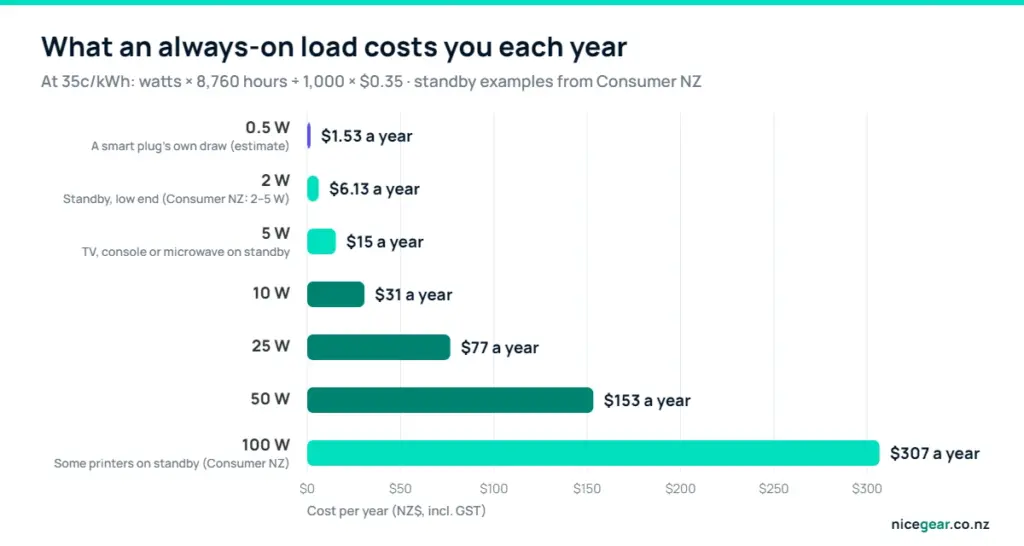
Assumes 35c/kWh, roughly the average NZ residential price. Change it to match your bill (your latest invoice shows the per-kWh rate). Presets are typical ratings only, so check the label on your appliance. Standby is counted for every hour the appliance is not running. With the smart plug switched off, standby drops to zero, but the plug itself draws a little power all year (0.5 W is an estimate).
Worked example: a bedroom heater
A 2,000 W fan heater running five hours a day over a 120-day winter uses 1,200 kWh, about $420 at 35c/kWh. Schedule it for three hours instead and it drops to 720 kWh, plus about 4 kWh for the plug: roughly $254, saving about $166. The same plug on a TV and soundbar idling at 5 W saves about $11 a year.
What standby really costs
Consumer NZ says TVs, home theatre systems, games consoles and microwaves typically draw 2–5 W on standby. At 35c/kWh each watt left on all year costs about $3.07, so 5 W is around $15 a year, and a smart plug uses a little power itself. Older gear can be worse: Consumer NZ found some printers pull more than 100 W on standby.
For whole-house figures, an energy monitor fitted at the switchboard is the better tool.
Interoperability and the impact of Matter
Matter is an open standard from the Connectivity Standards Alliance that lets one device work with Apple Home, Google Home, Amazon Alexa and Samsung SmartThings, controlled over your home network rather than only through a company’s cloud. A Matter smart plug can join several of these at once, so an Android user and an iPhone user in the same house can both control it.
Matter runs over Wi-Fi (Tapo P110M) or Thread (Eve Energy). Thread needs a border router, built into devices such as the HomePod mini and Nest Hub (2nd gen). Not every app shows energy data from Matter plugs yet, so you may still open the maker’s app for power history.
Optimizing network connectivity and range
Most Wi-Fi smart plugs only use the 2.4 GHz band. It reaches further through walls, but if your router broadcasts one network name for both bands, a plug can fail to join. Setting up next to the router usually fixes it; if not, add a separate 2.4 GHz network for smart devices (our router settings guide shows where that option lives).
A plug at the far end of a long weatherboard house or in the garage may keep dropping off; a mesh Wi-Fi system usually solves that, and our home network setup guide covers planning for dozens of devices.
| Protocol | Hub needed? | Extends the mesh? | Best for |
|---|---|---|---|
| Wi-Fi (2.4 GHz) | No | No | A few plugs, simple app control |
| Zigbee | Yes, a coordinator | Yes | Home Assistant and many sensors |
| Thread (Matter) | A border router | Yes | Apple Home and local control |
| Bluetooth | No | No | Setup only on most plugs |
Scheduling and automation strategies
Most apps offer four levels of control:
- Schedules: fixed times, such as a towel rail from 6 to 8 am and 5 to 8 pm.
- Countdown timers: switch off after a set time, handy for heaters and chargers.
- Away mode and sunset timers: lamps come on at varied times while you’re on holiday.
- Triggers: a hub can turn the dehumidifier on when a humidity sensor passes 65%; our home automation explainer covers routines like this.
Smart plug for heater: the rules
A 2,000 W heater draws about 8.7 A (2,000 ÷ 230), close to a 10 A plug’s limit, for hours at a time.
- Plug the smart plug straight into a wall socket, never into a power board or double adaptor.
- Use a plug rated 10 A / 2,300 W or more, and keep the heater at 2,000 W or less.
- Choose a heater with a mechanical switch or dial. Electronic touch controls usually stay off when power returns, so the schedule can’t start them.
- Pick heaters with tip-over and overheat cut-outs, and keep them clear of bedding and curtains.
- Check the plug and socket for warmth the first few times; discolouration or a burning smell means stop.
Physical design and multi-plug solutions
Compact “mini” plugs such as Tapo’s are designed to leave the neighbouring outlet free, while bulkier plugs can block the second outlet on a double wall socket.
| Type | Outlets | Typical use | Watch out for |
|---|---|---|---|
| Mini plug | 1 | Heaters, lamps, dehumidifiers | Bulky designs blocking the next outlet |
| Double plug | 2 | Bedside lamp plus fan | Shares one 10 A socket |
| Smart power board | 4, often with USB | Desks and TV cabinets | Total load still 10 A |
| Outdoor plug (IP44) | 1–2 | Garden and Christmas lights | Needs an RCD-protected outdoor socket |
Security and privacy for smart hardware
A smart plug is a small computer on your network, so treat it like one:
- Use a unique password on the app account (a password manager helps) and turn on two-factor sign-in.
- Install firmware updates, and favour brands that keep issuing them.
- Put smart devices on a guest or separate network if your router supports it.
- Prefer plugs that work locally (Matter, Zigbee or Home Assistant) if you’d rather not depend on one cloud account.
If you’re planning cameras, sensors and alarms as well, our guide to smart home security systems in NZ covers the wider setup.
Smart plugs in rental properties
Smart plugs suit renters because nothing is wired in or fixed to the walls. Schedules make portable heaters and dehumidifiers cheaper to run, flatmates can each get app access instead of sharing one login, and when you move you simply reset the plugs and take them with you.
For landlords, a portable heater on a smart plug doesn’t count towards the Healthy Homes heating standard, which calls for fixed heating in the main living room.
What to check before you buy
Most smart plug problems come down to a few mistakes:
- Buying an overseas version and using a travel adaptor.
- Mixing three brands and three apps with no plan. Pick one app, or buy Matter plugs.
- Expecting big savings from switching off gadgets on standby.
- Scheduling a heater with electronic controls, which never turns back on.
Future trends in smart power management
Recent Matter versions let devices report energy use, so whole-home apps should increasingly show plug data. With time-of-use power plans common in NZ, a hub can also shift dehumidifiers and other flexible loads into cheaper hours, or sunny ones if you have solar.
Final thoughts
A good smart plug costs about $30, does one job well and can pay for itself within a winter on the right appliance. Buy the NZ version, keep heaters on their own wall socket, and let the energy readings show where the money goes.
Our take
- For most homes, buy the Tapo P110M: energy monitoring, Matter and about $34.
- On a tight budget with no Apple devices in the house, the P110 does the same job for less.
- Running Home Assistant? Build around Zigbee or Thread plugs, which strengthen your mesh.
- Use smart plugs to schedule heaters, dehumidifiers and towel rails, because that’s where the savings are.
- Leave anything hard-wired to a licensed electrician.
Prices and line-ups change often; everything here was checked in September 2026. Nicegear is independent, sells nothing and has no paid placements.
Sources and further reading
- Electrical marks, including the RCM – WorkSafe Energy Safety
- Doing your own electrical work – WorkSafe
- Tapo P110M mini smart Wi-Fi plug – TP-Link
- Smart plugs and powerboards (NZ) – Brilliant Lighting
- How much power do your appliances use? – Consumer NZ
- Matter – Connectivity Standards Alliance
- Electric car use by country – Wikipedia
FAQs
Can I use a US smart plug with an adapter in NZ?
No. US smart plugs are designed for 120 V, and running one through a travel adaptor on NZ’s 230 V supply can damage it or create a fire risk. Buy an AU/NZ version with Type I pins and an RCM mark.
What is the best smart plug for a 2000W heater?
A plug rated 10 A / 2,300 W or more, such as the Tapo P110 or P110M, plugged straight into the wall. Use a heater of 2,000 W or less with a mechanical switch, so it turns on when the plug does.
Does a smart plug need a hub?
Wi-Fi plugs such as Tapo and Brilliant connect straight to your router, so no. Zigbee plugs need a Zigbee coordinator, and Thread plugs such as Eve Energy need a Thread border router like a HomePod mini.
Will a smart plug save me money on my power bill?
Yes, if it cuts the hours big loads run: trimming a 2,000 W heater by two hours a day over a 120-day winter saves about $166 at 35c/kWh. Switching off gadgets idling at 2–5 W saves only a few dollars a year.
What happens if the Wi-Fi goes down?
The plug stays in its current state and its physical button still works. Whether schedules keep running depends on the brand, while Matter, Zigbee and Thread plugs can keep working locally through a hub.
Are smart plugs safe for electric blankets?
Many electric blankets have electronic controllers that stay off when power returns, so a smart plug often can’t turn them on. Use it to make sure the blanket switches off, never to leave it running while you sleep.
Can I use smart plugs in a rental?
Yes. Nothing is wired in, so they suit tenants: schedule heaters and dehumidifiers, then factory-reset the plugs and take them with you.
Is Matter better than Wi-Fi for smart plugs?
Matter isn’t a replacement for Wi-Fi; it’s a common language that runs over Wi-Fi or Thread. A Matter smart plug is the better buy if your household mixes Apple, Google and Alexa, or you want local control.


